Migrating from Selenium to Playwright: The Complete Guide
Migrating from Selenium to Playwright is more than rewriting tests. This guide covers costs, risks, timelines, and how teams actually do it.

Selenium has been the default framework for web testing for almost two decades. Teams have invested years building frameworks, utilities, and expertise around it. But SPAs, modern JS frameworks, and faster release cycles exposed problems Selenium wasn't built to handle.
Playwright was built for this. Independent benchmarks show Playwright tests cutting regression execution time by up to 75% in some cases. That's a best-case number, not typical. The actual gain depends on what's making your Selenium suite slow. If most time goes to explicit waits and driver overhead, you'll see big improvements. If the bottleneck is slow backend responses or test data setup, switching frameworks won't fix that.
We've worked with teams at various stages of this migration. The hard part isn't rewriting test code. It's the infrastructure, the people, and the organizational buy-in. This guide covers what we've seen work.
Assessing the Cost and Risk of Migration
Converting test scripts is the obvious cost. But the real cost is everything else: infrastructure, people, and the org.
Infrastructure
Your Selenium Grid doesn't translate to Playwright. Playwright does have a Selenium Grid integration, but the docs explicitly warn it might break in the future. If you're running distributed test execution through Grid, you need a replacement.
Playwright's test runner handles parallelization via worker processes on a single machine. That's a different model from Grid's distributed architecture. It makes local dev faster and CI simpler, but for large suites you'll likely need an orchestration platform for dynamic test distribution across CI machines.
Your CI/CD pipelines will need reconfiguration. Docker images, environment setup, browser binary management: all of it changes. Playwright simplifies some of this by auto-installing browser binaries, but plan for the switchover before you have tests depending on it.
Team
Most Selenium teams work in Java or Python with synchronous patterns. Playwright is async-first and its strongest ecosystem is JavaScript/TypeScript. That means learning new syntax, async/await, and a different mental model for waits. It's worth noting that Playwright does support Java, Python and .NET, although feature support may vary and TypeScript is strongly recommended, it shouldn't be what prevents you from migrating to Playwright.
Budget for a productivity dip. Most engineers get comfortable within 2-3 weeks, but during migration they're maintaining Selenium tests while learning Playwright, troubleshooting in both, and managing two sets of dependencies.
Test writers have the easier transition. Framework maintainers have the harder job: rebuilding custom utilities, auth flows, and test infrastructure from scratch.
The Org
Don't underestimate the politics. Engineers who built complex Selenium frameworks have years invested in that work. Telling them it's being replaced creates friction, especially if they feel their specialized knowledge is being devalued. Address this directly. The skills transfer (test design, debugging, CI thinking) even if the syntax doesn't.
Start with phases. Migrate a small subset of critical tests first. Some teams find that partial migration is the permanent state: core user paths in Playwright, edge cases in Selenium. That's fine if the cost of migrating those last tests isn't worth it.
Runa, a fintech operating in 30+ countries, migrated from Selenium and REST Assured to Playwright after hitting manual release bottlenecks, limited dev/QA collaboration, and difficulty diagnosing failures. After migration: reduced flakiness, faster releases, better test speed through parallelism.
When Migration May Not Be Worth It
Not every team should migrate. Skip it if:
- Your Selenium suite is small, stable, and rarely changes. 50-100 tests that pass reliably? The migration cost will exceed the benefit. Migration pays off when the existing suite is causing ongoing pain.
- Your tests are mostly API-level. If your suite is light on browser interaction and heavy on API validation, Playwright's advantages are smaller. Selenium handles simple page loads and form submissions fine.
- You're deep in Java-ecosystem tooling. TestNG, Maven Surefire, custom Java reporting pipelines, JUnit integrations. You're not just swapping test libraries. You're rebuilding your entire test infrastructure.
- You're mid-release with no bandwidth. Half-finished migrations create more problems than they solve. Wait for a window.
If none of these apply and your suite is causing real pain (slow CI, flaky tests, maintenance burden), keep reading.
Migration Strategy: How Teams Actually Do It
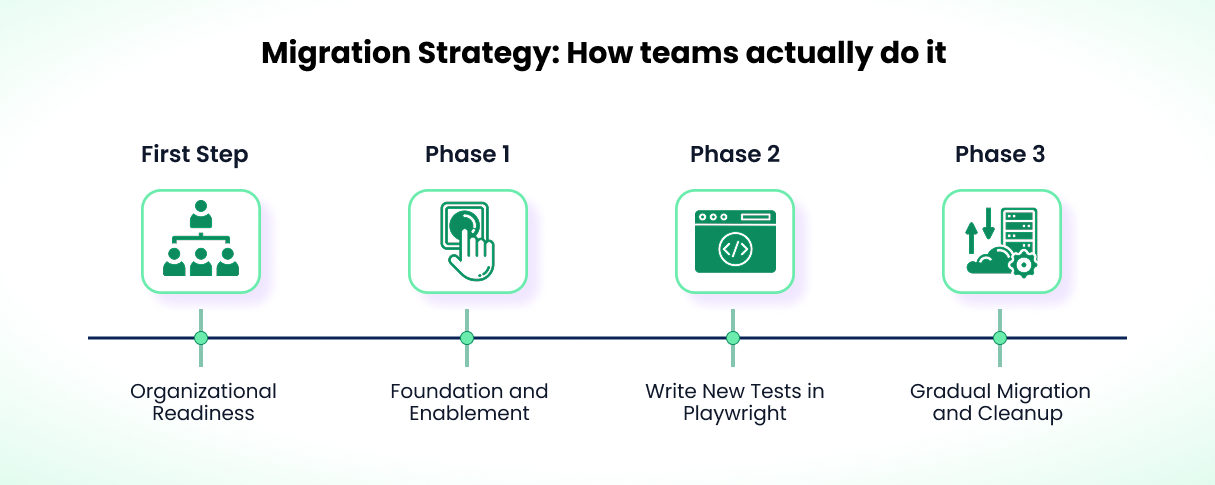
Prerequisite: Ownership
Migrations fail without a clear owner. "Everyone's responsibility" means no one's priority. Pull 2-3 engineers off regular work for a quarter if you can. If you can't, assign sprint goals and treat migration like feature work.
A suite of 500 tests won't migrate in two weeks. Set expectations early with QA, dev, and DevOps.
Phase 1: Infrastructure First
Don't write tests yet. Set up Playwright, install dependencies, get one test running locally, then in CI. Sort out Node.js versions, browser binary access, and environment variables before you have 50 tests depending on the answers.
If your Selenium framework has custom auth helpers or navigation utilities, build the Playwright equivalents now.
Example Playwright setup:
// playwright.config.ts
import { defineConfig, devices } from "@playwright/test";

export default defineConfig({
  testDir: "./tests",
  timeout: 30000,
  use: {
    baseURL: "https://your-app.com",
    trace: "on-first-retry",
    screenshot: "only-on-failure",
  },
  projects: [
    { name: "chromium", use: { ...devices["Desktop Chrome"] } },
    { name: "firefox", use: { ...devices["Desktop Firefox"] } },
  ],
});
Get one Playwright test green in your pipeline. Just one.
Watch for common early pitfalls:
- Fixture scope confusion. Playwright fixtures can be scoped to individual tests or to workers. Test-scoped fixtures run fresh for every test, while worker-scoped fixtures are shared across all tests running in the same worker process. Mixing these up causes state leaks or unnecessary setup overhead. Use test-scoped fixtures for things like a fresh page or browser context. Use worker-scoped fixtures for expensive setup that's safe to share, like database connections or authenticated sessions.
- Test data isolation in parallel execution. Playwright runs tests in parallel by default. Tests that share mutable state (like database rows or file system state) will interfere with each other. Each test should create its own data or use unique identifiers to avoid collisions.
- Building custom utilities before understanding Playwright's patterns. Playwright's built-in fixtures, auto-waiting, and locator API already handle many scenarios that required custom code in Selenium. Start simple and expand as you learn what the framework provides out of the box.
- Overcorrecting on locator strategy. Teams coming from Selenium's explicit CSS and XPath selectors sometimes swing too far toward text-based locators like
getByText()or positional selectors likenth(). These break when content changes or lists reorder. PrefergetByRole,getByTestId, or locators scoped to a parent container. The goal is locators that survive UI changes without being so generic they match the wrong element. For more on this, see 14 lessons learned after 500+ Playwright tests.
Phase 2: Write New Tests in Playwright
Start with the tests that matter most: login, checkout, core business flows. These run most frequently and hurt most when they're slow or flaky. Focus on tests that execute dozens of times per day, not tests that run once per release.
Don't blindly port Selenium tests line-by-line. Rewrite them. Check whether the old test still covers what matters, whether the steps make sense, and whether assertions could be clearer.
Here's a common Selenium pattern:
WebDriverWait wait = new WebDriverWait(driver, Duration.ofSeconds(10));
WebElement loginButton = wait.until(
  ExpectedConditions.elementToBeClickable(By.id("login-button"))
);
loginButton.click();

WebElement usernameField = driver.findElement(By.id("username"));
usernameField.clear();
usernameField.sendKeys("user@example.com");

WebElement passwordField = driver.findElement(By.id("password"));
passwordField.clear();
passwordField.sendKeys("password123");

WebElement submitButton = driver.findElement(By.id("submit"));
submitButton.click();

wait.until(ExpectedConditions.urlContains("/dashboard"));
Playwright equivalent:
await page.goto("/login");
await page.locator("#username").fill("user@example.com");
await page.locator("#password").fill("password123");
await page.locator("#submit").click();
await expect(page).toHaveURL(/.*dashboard/);
Auto-waiting removes the explicit wait boilerplate. The test reads like what it actually does: go to login, fill fields, click submit, check URL.
Playwright's test generator (npx playwright codegen) is useful here. It records browser actions and generates test code. Navigate through the same flows and get Playwright code with correct locators. It won't produce perfect tests, but it saves time on the mechanical conversion.
Run both frameworks in CI during this phase. If Playwright tests fail but Selenium passes, tune the Playwright tests. If Selenium fails but Playwright passes, you've likely found flaky tests that Playwright handles better.
For each migrated test, the Playwright version should be faster (typically 20-40%), equally stable or better, and cover the same scenarios. If it's slower or flakier, investigate before moving on.
Phase 3: Gradual Migration and Cleanup
Not every test needs to migrate. If a test covers a dead feature or duplicates your API tests, delete it. Use migration to measure actual coverage gaps instead of counting tests.
Running two frameworks long-term has real overhead: two dependency chains, two CI configs, two sets of debugging tools, two mental models. If your Selenium tail is small (under 50 tests), finishing the migration is probably cheaper than maintaining dual infrastructure. Check this tradeoff periodically. Don't let partial migration become the default forever.
Keep both running in CI until Playwright coverage is proven. Some teams do this for a quarter, others for six months.
Key Technical Differences
Async/Await
Selenium is synchronous. Playwright is async. Every action needs await:
test("user can login", async ({ page }) => {
  await page.goto("/login");
  await page.locator('[name="email"]').fill("user@test.com");
  await page.locator('button[type="submit"]').click();
  await expect(page.locator(".welcome")).toBeVisible();
});
The most common mistake: missing an await. The test finishes before the action completes, passes when it shouldn't, and you don't notice until something else breaks. Always await actions and assertions.
Playwright also has concurrency patterns you need to know:
test.describe.serial forces sequential execution within a parallel suite. If one test fails, the rest are skipped. Useful when step B depends on step A, but use it sparingly:
test.describe.serial("onboarding flow", () => {
  test("step 1: create account", async ({ page }) => {
    // ...
  });

  test("step 2: verify email", async ({ page }) => {
    // ...
  });

  test("step 3: complete profile", async ({ page }) => {
    // ...
  });
});
Shared state in parallel execution will bite you. Playwright runs test files in parallel by default. Two tests modifying the same database row, feature flag, or file will break each other. Each test needs its own data. For expensive shared setup, use worker-scoped fixtures:
import { test as base } from "@playwright/test";

// Worker-scoped: runs once per worker process, shared across tests in that worker
const test = base.extend<{}, { apiClient: APIClient }>({
  apiClient: [
    async ({}, use) => {
      const client = await APIClient.create();
      await use(client);
      await client.cleanup();
    },
    { scope: "worker" },
  ],
});

// Test-scoped (default): runs fresh for each test
const testWithPage = test.extend<{ dashboardPage: Page }>({
  dashboardPage: async ({ page }, use) => {
    await page.goto("/dashboard");
    await use(page);
  },
});
Auto-Waiting vs. Explicit Waits
Selenium makes you think about timing constantly. Playwright auto-waits. When you call click(), it waits for the element to be attached, visible, stable, and enabled. Most of your explicit waits and sleeps go away.
You still need explicit waits for custom conditions (see debugging Playwright timeouts):
// Wait for specific count
await expect.poll(() => page.locator(".item").count()).toBeGreaterThan(5);

// Wait for network idle
await page.waitForLoadState("networkidle");
Browser Contexts for Isolation
Selenium needs Grid for parallel execution. Playwright uses browser contexts. One browser instance, multiple isolated contexts:
const browser = await chromium.launch();
const context1 = await browser.newContext();
const context2 = await browser.newContext();

// Each context is isolated: cookies, storage, and cache don't leak between them
const page1 = await context1.newPage();
const page2 = await context2.newPage();
No separate browser processes per test.
This also makes multi-user testing easy. Here's an admin and regular user in the same test:
test("admin changes are visible to regular user", async ({ browser }) => {
  // Create two isolated contexts with different auth states
  const adminContext = await browser.newContext({
    storageState: "playwright/.auth/admin.json",
  });
  const userContext = await browser.newContext({
    storageState: "playwright/.auth/user.json",
  });

  const adminPage = await adminContext.newPage();
  const userPage = await userContext.newPage();

  // Admin publishes a new announcement
  await adminPage.goto("/admin/announcements");
  await adminPage.locator("#title").fill("Maintenance Window");
  await adminPage.locator("#publish").click();
  await expect(adminPage.locator(".status")).toHaveText("Published");

  // Regular user sees it immediately
  await userPage.goto("/dashboard");
  await expect(userPage.locator(".announcement")).toContainText(
    "Maintenance Window",
  );

  await adminContext.close();
  await userContext.close();
});
In Selenium, this requires two WebDriver instances or manual cookie manipulation.
One caveat: browser contexts isolate client-side state (cookies, local storage, cache), not backend state. Two tests modifying the same database rows will conflict regardless of context isolation. Database cleanup, unique test data per run, or transactional rollbacks are still on you. See test data strategy for more.
Network Interception
page.route() gives you built-in network interception. No proxy servers, no browser extensions, no WireMock. Just intercept and mock:
test("shows error on payment failure", async ({ page }) => {
  // Intercept the payment API and return a failure response
  await page.route("**/api/payments", (route) =>
    route.fulfill({
      status: 402,
      contentType: "application/json",
      body: JSON.stringify({ error: "Card declined" }),
    }),
  );

  await page.goto("/checkout");
  await page.locator("#card").fill("4111111111111111");
  await page.locator("#submit").click();
  await expect(page.locator(".error")).toHaveText("Card declined");
});
You can also modify real responses, block resources to speed up tests, or wait for specific requests:
await page.route("**/*.{png,jpg,gif}", (route) => route.abort());
await page.route("**/analytics/**", (route) => route.abort());

await page.route("**/api/users/me", async (route) => {
  const response = await route.fetch();
  const json = await response.json();
  json.featureFlags.newDashboard = true;
  await route.fulfill({ response, body: JSON.stringify(json) });
});
In Selenium, this typically meant running a separate proxy server or configuring WireMock alongside your suite.
Authentication State Storage
storageState saves an authenticated session (cookies, local storage, IndexedDB) to a JSON file. Reuse it across every test.
In Selenium, auth means logging in through the UI every time (slow), injecting cookies (brittle), or sharing a browser session (breaks isolation). Playwright handles this with a setup project:
// tests/auth.setup.ts
import { test as setup, expect } from "@playwright/test";

const authFile = "playwright/.auth/user.json";

setup("authenticate", async ({ page }) => {
  await page.goto("/login");
  await page.getByLabel("Email").fill("user@example.com");
  await page.getByLabel("Password").fill("password123");
  await page.getByRole("button", { name: "Sign in" }).click();
  await page.waitForURL("/dashboard");

  // Save the authenticated state to a file
  await page.context().storageState({ path: authFile });
});
// playwright.config.ts
export default defineConfig({
  projects: [
    { name: "setup", testMatch: /.*\.setup\.ts/ },
    {
      name: "chromium",
      use: {
        ...devices["Desktop Chrome"],
        storageState: "playwright/.auth/user.json",
      },
      dependencies: ["setup"],
    },
  ],
});
Every test starts already authenticated. The setup runs once, all tests reuse the saved state. If your Selenium suite logged in through the UI for every test, this alone saves minutes.
Pitfalls to watch for: sessions expire during long CI runs, so auth setup succeeds but tests later fail with 401s. If parallel workers share one account and your app enforces single-session login, workers invalidate each other. Playwright's docs cover one account per parallel worker using testInfo.parallelIndex. Some apps also rotate CSRF tokens on sensitive actions, which makes stored state go stale. Test your auth strategy under parallel load before scaling up.
Trace-Based Debugging
Selenium gives you screenshots and console logs. Playwright's trace viewer records everything: every action, network request, and DOM snapshot.
// playwright.config.ts
use: {
  trace: 'on-first-retry',
  video: 'retain-on-failure',
  screenshot: 'only-on-failure',
}
When a test fails, you open the trace and see exactly what happened at each step. See debugging Playwright tests in CI for more.
CI and Reporting
CI migration gets underestimated. Selenium's ecosystem extends well beyond the test library.
CI Pipelines
Selenium needs ChromeDriver for Chrome, GeckoDriver for Firefox, each matching the browser version exactly. Playwright bundles browsers with the package. playwright install --with-deps handles everything. Different Docker images, simpler config.
GitHub Actions example:
name: Playwright Tests
on: [push, pull_request]

jobs:
  test:
    runs-on: ubuntu-latest
    steps:
      - uses: actions/checkout@v4
      - uses: actions/setup-node@v4
        with:
          node-version: "18"
      - name: Install dependencies
        run: npm ci
      - name: Install Playwright browsers
        run: npx playwright install --with-deps
      - name: Run Playwright tests
        run: npx playwright test
      - name: Upload test results
        if: always()
        uses: actions/upload-artifact@v4
        with:
          name: playwright-report
          path: playwright-report/
Orchestration and Reporting
Playwright includes built-in sharding (--shard=1/4) that splits tests statically across CI machines. Works for smaller suites. At scale, it's suboptimal because tests are distributed without considering actual durations, so some workers sit idle while others are still running.
Currents uses a queue-based approach instead: tests go to the next available worker as it finishes. This matters when test durations vary (and they always do).
Running both Selenium and Playwright in CI creates reporting gaps. A few options:
Playwright's built-in HTML reporter generates a self-contained report with results, traces, and screenshots. Good enough if you don't need cross-run analytics or trend data.
Currents combines reporting with orchestration: dashboards, flaky test detection, dynamic test distribution, instant access to traces/screenshots/videos without downloading CI artifacts, and GitHub PR integration.
Realistic Timelines
Here's what we've seen work:
The spike (2-4 weeks): Playwright installation, CI proof of concept, fixtures for auth and test data, utility migration, and 5-10 critical path tests converted. This surfaces blockers early.
Low-intensity mode (ongoing): New tests go in Playwright, existing tests migrate gradually. Engineers typically match their previous writing speed within 2-3 weeks.
Parallel running (1-2 quarters minimum): Both frameworks run in CI until you're confident Playwright coverage is stable and equivalent.
What speeds things up or slows them down:
- Custom framework complexity matters more than test count. Minimal custom utilities = fast migration. Complex auth flows or test data setup can add weeks.
- Clean Selenium tests with clear page objects convert quickly. Hard-coded waits, brittle selectors, and duplicated logic mean refactoring on top of conversion.
- One engineer with Playwright experience on the team makes a big difference.
- Protected time and leadership backing keep things moving. Migration competing with feature work leads to stalling.
You don't have to migrate everything. Many teams move critical paths (60-70% of tests) to Playwright and leave edge cases in Selenium. The first batch delivers most of the execution time savings.
Using AI for Migration
AI tools (Cursor, ChatGPT, Claude, GitHub Copilot) are good at the mechanical parts of migration. (For a broader look at AI in the Playwright ecosystem, see the state of Playwright AI in 2026.)
They handle syntax conversion well: findElement(By.id("button")) to page.locator("#button"), WebDriverWait to auto-wait, assertion syntax updates. For suites where most tests follow simple linear flows (navigate, fill form, click, verify), AI can handle the bulk of conversion.
AI also suggests better locators. Selenium tests are full of XPath and CSS selectors that could be getByRole, getByText, or getByLabel in Playwright. Verify the suggestions, but they're usually improvements.
Where AI falls short: complex flows with branching logic, conditional waits, or multi-step interactions across pages. AI converts the syntax correctly but misses behavioral differences between frameworks. Custom utilities and auth helpers also need human work. AI can't map your bespoke Selenium abstractions to Playwright without context. And always check for hardcoded secrets that should be environment variables.
The workflow that works best: build your infrastructure first (fixtures, utilities, helpers), migrate 5-10 tests manually, then feed those as examples to AI tools along with the Selenium tests to convert. The output will match your conventions better than cold prompting.
Conclusion
Migration is real work, not a weekend project. Start with infrastructure, not tests. Get one test green in CI, build your utilities, then scale. Don't port tests blindly. Don't migrate everything if it's not worth it. And don't start until you have someone who owns it.
Join hundreds of teams using Currents.
Trademarks and logos mentioned in this text belong to their respective owners.