State of Playwright AI Ecosystem in 2026
Why has AI adoption accelerated in Playwright? Why does its ecosystem seem to absorb new capabilities so naturally, from autonomously planning test flows to self-healing failing steps?
AI didn't become interesting in Playwright because "tests can be generated." It became interesting because Playwright is now turning testing workflows into programmable building blocks: plans, snapshots, traces, videos, reports, and repeatable execution surfaces that agents can drive and humans can audit.
The ecosystem is moving from "LLM writes some code" to "LLM participates in the workflow": exploring an app, producing a plan, generating tests, collecting proof artifacts, and iterating when things break. That shift is powered by three converging pieces:
- Constrained execution layers (MCP and tool-based automation),
- Agent specialization (planner → generator → healer),
- Artifact-first debugging (traces, videos, reports, dashboards).
This article maps what exists today, what still breaks, and what's likely next, especially as the bottleneck shifts from writing tests to operating test suites at scale.
The Current Playwright AI Landscape: What Exists Today (and What It Actually Does)
Playwright's AI ecosystem spans multiple tools, each addressing a different part of the test automation workflow. While these tools unlock meaningful gains, they also have clear ceilings. Understanding both is critical to using them effectively.
1. MCP: The "Tools Layer" That Gives Models Superpowers
The Playwright MCP server provides a structured execution layer between AI systems and Playwright. Rather than letting an AI model infer what it can or cannot do, MCP exposes a fixed set of over 20 tool capabilities that the model can invoke — from browser_click and browser_navigate to browser_snapshot and browser_console_messages — with tightly scoped access to the browser, filesystem, and runtime environment.
A key architectural decision: Playwright MCP operates on the accessibility tree, not screenshots. The server returns structured accessibility snapshots that represent the page as a hierarchy of roles, names, and states — the same data assistive technologies consume. This means AI models don't need vision capabilities to interact with pages, and the resulting automation is deterministic and fast.
This structure significantly reduces action-level hallucinations. Instead of guessing selectors, APIs, or execution paths, an AI system operates only within the constraints defined by the engineer.
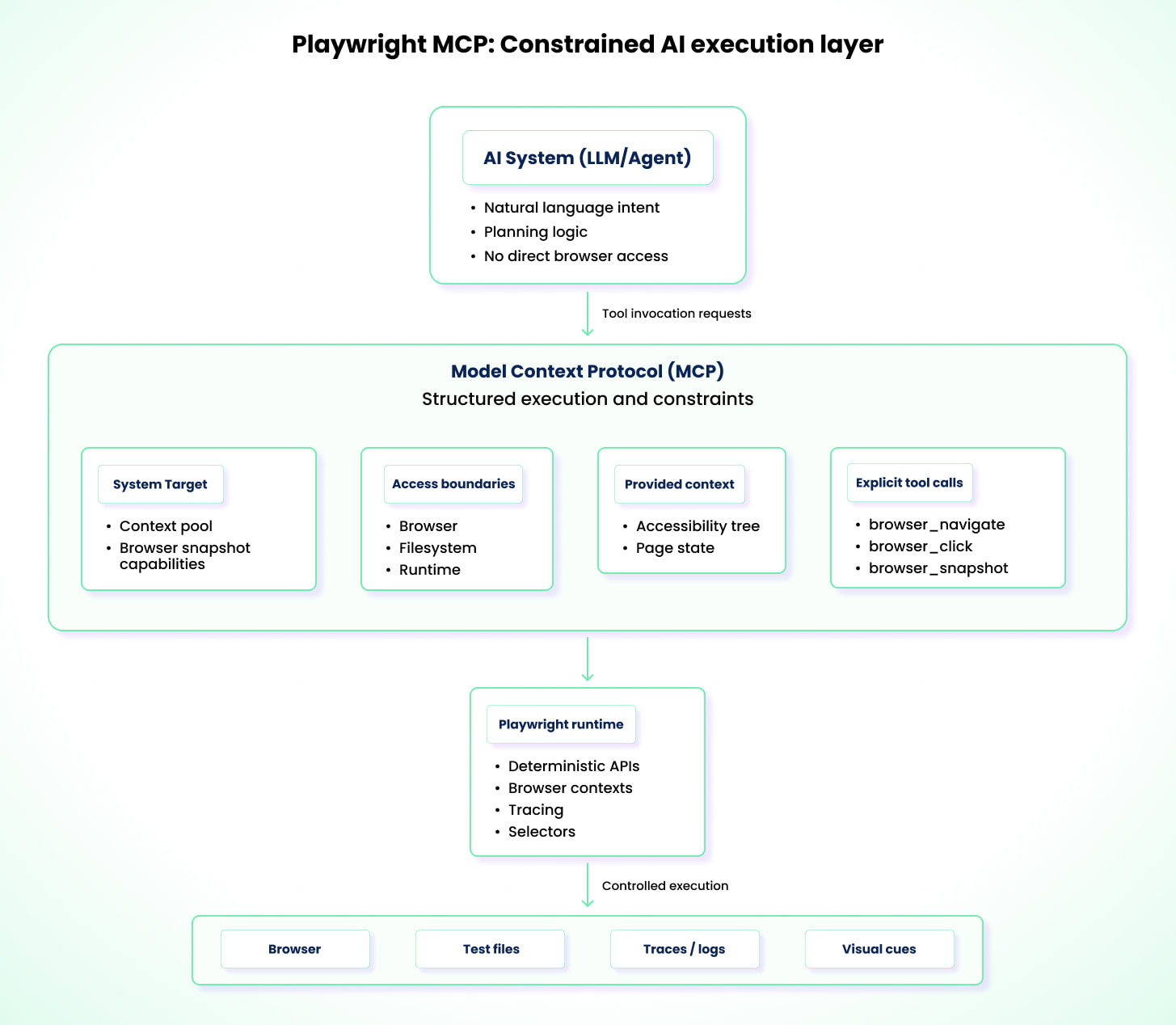
That constraint is what makes MCP valuable. It shifts AI interaction from free-form instruction following to constrained test execution that is reproducible and auditable. Failed runs become easier to diagnose, and standards easier to enforce. For example, you can instruct an AI, through MCP, to navigate between pages, interact with specific elements, analyze page state, and generate tests. MCP supplies the execution surface, such as the accessibility tree and permitted browser actions, while preventing the AI from stepping outside those boundaries.
However, MCP's safety is defined by what teams choose to expose. Filesystem access, environment variables, and CI secrets remain common sources of risk if permissions are not carefully scoped. MCP is not test strategy, it's the execution toolbox. Strategy still comes from your prompts, your standards, and your architecture.
MCP limitations
- It has no inherent reasoning or strategy for test design and relies entirely on user instructions and model behavior.
- It is only as powerful as the tools and permissions exposed through it.
- It can be token-expensive vs CLI workflows. Benchmarks show MCP consuming roughly ~114K tokens per test compared to ~27K for CLI-based approaches, a ~4x difference, because MCP streams full accessibility trees inline rather than saving them to disk.
2. Playwright Test Agents
Since v1.56, Playwright ships with three built-in Test Agents: planner, generator, and healer. Under the hood, each agent is a collection of instructions and MCP tool definitions, not a standalone binary. Your AI coding assistant (VS Code Copilot, Claude Code, OpenCode) executes these definitions on your behalf.
You set them up with a single command:
npx playwright init-agents --loop=vscode
This generates agent definitions and a seed.spec.ts file in your project. The seed test is critical: it provides the page context that agents use to bootstrap execution, runs your global setup, and serves as a style exemplar for all generated tests. The agents also require an LLM backend (OpenAI, Anthropic, etc.), so plan for API access and token costs as part of your adoption.
The agents produce an auditable file structure:
specs/              # Markdown test plans (from planner)
tests/              # Generated Playwright tests (from generator)
  seed.spec.ts      # Seed test for environment setup
As a planner, the agent explores a website based on natural language instructions such as "Test the user registration flow" and produces a structured Markdown plan in specs/ that outlines steps, expected outcomes, and edge cases.
As a generator, it takes that Markdown plan and converts it into executable TypeScript files under tests/. It uses live browser introspection to verify that selectors actually exist and assertions hold.
As a healer, when a test fails, the agent re-runs the failing test, inspects the current UI via debug mode, console logs, and network requests, and attempts to repair the broken step. If the healer determines the underlying functionality is genuinely broken, not just a flaky locator, it can skip the test rather than endlessly retrying. Guardrails cap the retry loop to prevent runaway execution.
These three agents can be used independently, sequentially, or chained into a continuous loop (plan → generate → run → heal) that reduces manual orchestration. However, they still struggle in certain areas.
Playwright agent limitations
- Agents lack deep domain reasoning. They can verify whether a UI reflects a value, but not whether the value is logically correct. For example, a calculation that displays 10.50 instead of 10.51 may still be considered valid.
- Even when using accurate traces and DOM snapshots, agents can misinterpret timing, async ordering, or causality, leading to confident but incorrect fixes instead of true root-cause resolution.
- Agents require a working authentication setup (typically via
storageStatein fixtures) before they can test anything behind a login. Without this, agents stall at the login screen, which is a common early adoption blocker. - Their error recovery is largely limited to client-side failures. In the case of a server-side crash, an agent may repeatedly attempt to interact with elements that will never appear.
3. Playwright CLI + Skills: A Lightweight Alternative for Agent Workflows
Playwright CLI is Playwright's official command-line entrypoint for running Playwright Test, generating tests, capturing artifacts, and debugging executions. It's the same Playwright runtime you use in code, but exposed as a set of stable commands that work locally and in CI. The CLI matters because it turns testing workflows into repeatable operations, where agents can drive and humans can audit.
Why it feels different from MCP-heavy flows
Instead of continually injecting large page state into the model context, the CLI workflow can:
- capture local accessibility snapshots saved to disk
- update them as interactions happen
- keep the model "lighter" and more token-friendly
This matters in real usage because large accessible trees can be enormous; saving them locally instead of streaming them into every prompt reduces context pressure and cost.
A Skill is a concept from AI coding tools (Cursor, Claude Code, etc.): a packaged, reusable set of instructions that teaches an AI agent how to do a specific kind of work in a consistent way. Think of it as an "operating manual" the agent can load on demand: the name and description act like a trigger (so the agent knows when to use it), and the detailed steps only get pulled into context when the skill is invoked. That keeps prompts smaller, behavior more repeatable, and results easier to standardize across teams. Skills are not a Playwright feature. They are an integration pattern that works particularly well with the Playwright CLI.
What the Playwright CLI skill enables
A Skill teaches the agent how to use the CLI to:
- navigate, click, hover, select, upload
- take screenshots
- record trace and video
- generate a Playwright test from actions
- run the test (and even install Playwright if missing)
Playwright runs tests headless by default, and supports headed/UI/debug modes when you need to see what's happening.
When CLI + Skills is the best choice
Use it when you want:
- natural language → browser interaction → trace/video proof → generated test
- a fast bootstrap loop
- lower token overhead than context-heavy approaches
- a workflow you can hand to more people safely (because artifacts are produced)
Currents has developed a Playwright Best Practices Skill that you can use to get started with AI-assisted testing in Playwright.
4. Third-Party AI Integrations Around Playwright
Beyond Playwright's built-in AI agents, the ecosystem also supports a growing set of third-party AI integrations. These tools extend Playwright in different ways and generally fall into two categories.
Ecosystem and community tooling integrations
Open-source projects and community contributors primarily develop these integrations. They typically address gaps not directly covered by Playwright but needed across teams. Examples include alternative MCP server implementations, such as ExecuteAutomation's Playwright MCP, which offers a different execution surface for AI-driven tooling. Another example is Midscene, which uses computer vision techniques to interpret rendered pages and provides higher-level primitives such as aiAct, aiQuery, and aiAssert for interacting with the UI.
Proprietary AI testing platforms
This category includes commercial platforms that build AI-driven workflows on top of Playwright. Examples include ZeroStep, Octomind, and Currents. These tools focus on improving various aspects of testing, such as writing tests in natural language, automating test failure recovery, and intelligent analysis and long-term storage of the large volumes of data generated by test runs. For example, Currents MCP provides functionality such as CI debugging summaries and uses AI-assisted triage to categorize, explain, and prioritize test failures, to reduce the need for manual inspection in large test suites.
5. AI-Assisted Authoring: Refining Playwright Codegen Output
Even with the capabilities that Playwright Codegen provides, including choosing element selectors, converting user interactions into commands, and recording actions, it has clear shortcomings. This section is not about autonomous agents executing tests; it's about using AI as a refactoring/editor layer to turn Codegen's raw recordings into maintainable Playwright tests.
AI-assisted workflows build on Codegen by refining what is recorded. The model can remove noise (accidental clicks, redundant navigation), extract repeated actions into reusable helpers or Page Objects, and align the test with your project conventions (fixtures, naming, and setup patterns). It can also refactor brittle selectors into role- and label-based locators (for example, page.getByRole('button', { name: 'Login' })), which are typically more resilient to UI changes.
In practice, teams often use this as a quick loop: generate a rough draft with Codegen, let AI refactor it, then validate it in UI mode and traces. For example: Codegen → AI refactor → playwright test --ui → fix → commit.
There are still hard limitations, though:
- AI-driven refactors can introduce subtle nondeterminism by adding waits, retries, or relaxed assertions that mask timing issues rather than resolving them.
- AI struggles with highly custom or non-standard component libraries, such as canvas-based data grids, where meaningful roles or labels may not exist.
- Elements that appear and disappear rapidly, such as toast notifications or loading skeletons, can confuse the AI during repair attempts and lead to false-positive fixes.
Taken together, these capabilities and constraints shape how teams are using AI with Playwright in day-to-day testing workflows.
How AI Is (Actually) Changing Daily Workflows for QA & Dev Teams
AI integration in Playwright is changing how QA engineers and development teams operate daily. As workflows become more agentic and autonomous, it is necessary that you understand the impact across the different phases of testing.
Test Creation
- Instead of writing tests line-by-line, you can give a natural-language requirement to an agent, which can generate skeleton test cases in seconds.
- Engineers new to Playwright don't need to understand complex CSS selectors. They can describe an element's role and let AI resolve a more resilient ARIA-based locator.
- AI pairing tools such as VS Code with Copilot can take raw recorded test drafts and refactor them into a page object model.
Test Maintenance
- AI can act as an analysis layer to flag failure points or issues that are easy to miss, such as missing await statements, brittle selectors, or tests that fail to properly isolate data.
- In cases of a global UI change, you can use an agent to bulk-refactor locators across hundreds of files simultaneously.
- By using a consistent MCP configuration, your teams can apply AI-assisted changes that follow the same architectural standards across repositories and projects.
Debugging and CI Analysis
- With AI, you can get a human-readable summary of large trace files, logs, and flake history, instead of relying on manual effort to interpret them.
- AI can also help map failure points to probable root causes, such as network issues, race conditions, or environment drift.
- Tools like Currents use historical run data to classify failures over time, helping you distinguish between a new bug and a recurring environment issue.
The diagram below shows the shift in testing workflows when AI is introduced.
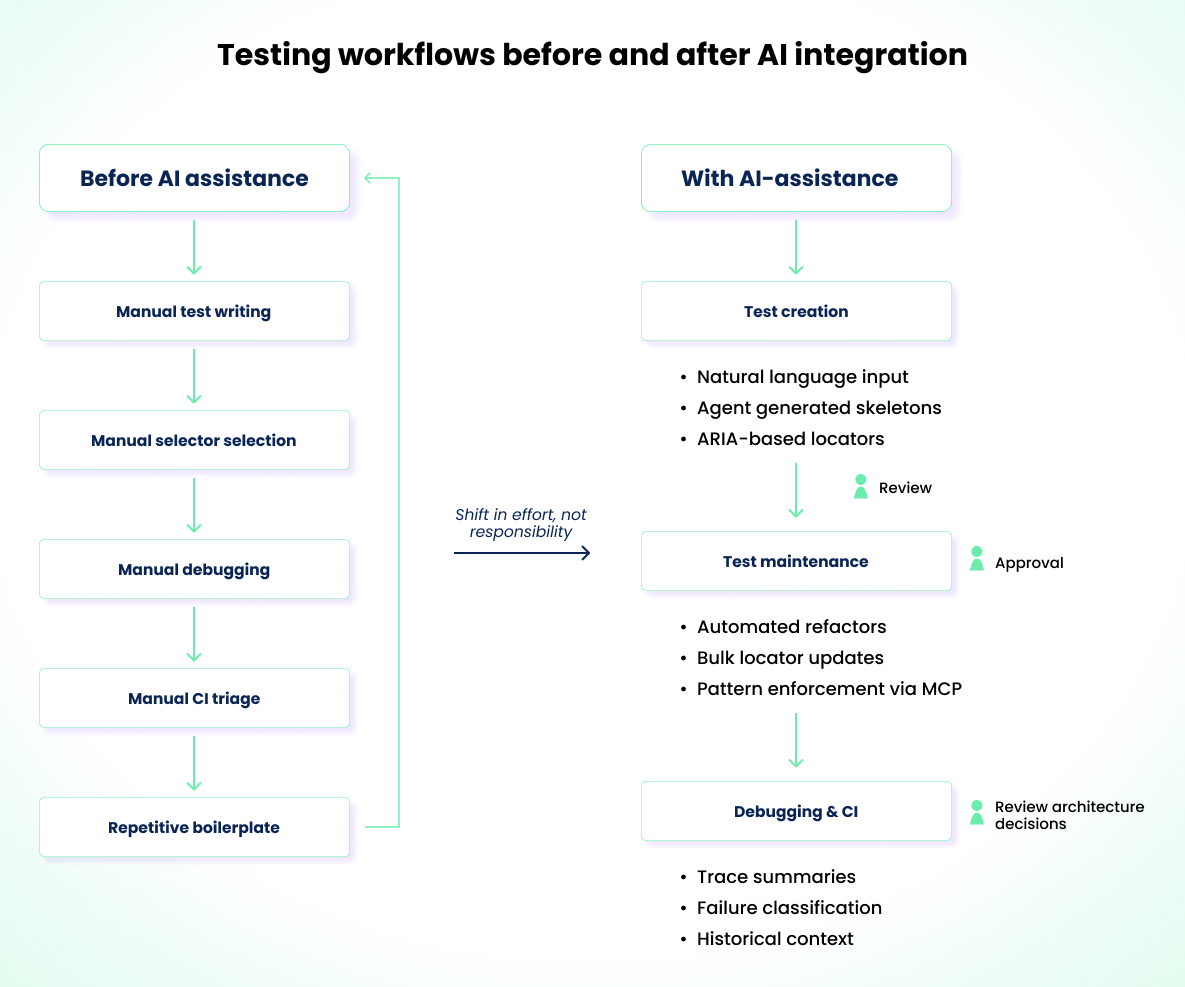
You can see how the inclusion of AI has changed collaboration and review across teams. Faster iteration cycles, reduced cognitive load for repetitive tasks, and less time spent on boilerplate setup are now common outcomes of AI-assisted workflows. However, AI is not absolute. There are still clear areas where it falls short and requires human judgment and oversight.
The Unsolved Problems: Where AI Testing Breaks Down Today
Even with rapid progress across tooling and workflows, several core problems in AI-driven testing remain unresolved.
Test explosion and governance
This is arguably the most consequential unsolved problem. If anyone can generate hundreds of tests quickly, the hardest question becomes:
- Which tests belong in CI?
- Which are redundant?
- Which are too expensive?
- What's your coverage signal besides "we have more tests"?
That is not a code-generation problem. It's an operations problem, and it becomes the central bottleneck once agent-driven generation matures.
Business logic understanding: AI can describe what happened in a test run and assert what is visible, but it cannot determine whether the outcome is correct without human-defined intent or pass/fail rules.
Reasoning across complex, stateful flows: Multi-step onboarding, permission models, and scenarios that depend on backend state or timing continue to break automated reasoning.
Architectural drift in large test suites: Without guardrails, AI changes slowly introduce inconsistent patterns: duplicated helpers, hidden state, weak assertions, mixed locator strategies.
Hallucinations during debugging: Confident but incorrect root-cause explanations remain one of the most dangerous failure modes in AI-assisted debugging.
These limitations define clear boundaries. For teams adopting Playwright AI tooling, they also clarify what to expect and where preparation matters most.
How Teams Should Prepare for AI Adoption
The following practices help teams adopt AI-assisted testing in a controlled and predictable way.
- Establish a deterministic baseline for your testing environment. This means committing to a locator strategy (prefer
getByRoleandgetByLabelover CSS selectors), defining shared fixtures for authentication and data setup, and ensuring yourplaywright.config.tsis stable. AI amplifies whatever foundation already exists. If the foundation is inconsistent, AI will scale the inconsistency. - Document architectural standards for AI to follow. This includes Page Object Model conventions, naming rules, and test data setup patterns.
- Introduce MCP integration incrementally. Start with AI reviewing tests, then generating code, before allowing agent-driven execution. Avoid jumping straight to autonomous execution without validating earlier stages.
- Treat AI-generated changes with care. Maintain human oversight through review gates, such as merge blocks, until pull requests are validated. Run generated tests multiple times before committing to catch nondeterminism early.
- Plan for cost and governance. Token usage in CI-level debugging can add up quickly (~114K tokens per MCP-based test). Put controls in place for privacy, security, accuracy, and false-positive tracking.
- Avoid scaling immediately. Start with a stable test suite or domain and expand only after reliability is proven.
After adoption, teams that plan beyond immediate needs will naturally look ahead to the next phase of Playwright AI development to ensure they stay aligned.
What's Next: The Near Future of Playwright + AI
Playwright's direction is visible through what has already shipped and where the team is investing. While Playwright doesn't publish a formal roadmap, the trajectory is clear from recent releases and public talks.
Agents are the focus
Improvement efforts are centered on the agent workflow itself. The emphasis is on making agents more reliable and more useful in real projects. Better plans, better generated tests, and smoother iteration when things fail. The direction is less about introducing entirely new concepts and more about strengthening the agent pipeline so teams can trust it as a default way to bootstrap and evolve tests.
Markdown-first test intent
The authoring experience is shifting from "writing Playwright code" to "describing intent." The specs/ directory convention already supports this: planner agents produce structured Markdown scenarios, and generator agents convert them into executable tests. This is not Gherkin or Cucumber syntax, it's free-form Markdown that agents interpret. Over time, teams may end up maintaining Markdown intent alongside generated code, with agents handling the translation layer.
Looped agent flows reduce manual orchestration
The --loop flag in init-agents already enables looped execution where plan, generate, run, and heal phases can repeat without a person re-triggering each step. Even if humans remain responsible for review and final decisions, the loop concept removes repetitive coordination and makes agent-driven iteration feel more like an automated pipeline.
The bottleneck shifts to test management at scale
If agents make it easy for anyone to generate tests quickly, the operational challenge becomes volume. Teams may end up with hundreds or thousands of tests in a short time, and the hard questions become governance: which tests are valuable, which belong in CI, which are redundant, and how to keep execution time and cost under control. Coverage visibility becomes more important in this world, but it is still not automatically solved by generating more tests. Teams will need additional process and tooling to manage and prioritize the suite.
As that shift happens, value tends to move toward systems that make large suites observable and operable, centralizing run history and artifacts, surfacing flakiness patterns, and reducing the cost of triage. That's the space where tools like Currents.dev naturally complement Playwright: not by generating more tests, but by helping teams keep growing suites understandable and maintainable.
Join hundreds of teams using Currents.
Trademarks and logos mentioned in this text belong to their respective owners.