Changelog

Changes across the Currents platform, CLI, reporters, and integrations.

Integration with Linear

Connect your workspace once and create or link Linear issues from any failing test — no tab switching, no copy-paste.

Integration with Linear

Connect your workspace once and create or link Linear issues from any failing test. No tab switching. No copy-paste. Context travels with you.

  • OAuth setup — one Linear workspace per org, enabled per project.
  • Create issues from test failures with team, assignee, and optional project.
  • Prefilled titles with test details, plus Include Details for test name, git info, and links back to Currents.
  • Link existing issues and comment with the same context.
  • Available now for all customers.

When a test fails, the Linear icon is right there. Click it, create a new issue or attach an existing one, and move on. Stack traces, run metadata, and Currents links go with it.

Create or link a Linear issue from a failing test in Currents

Built for how Linear actually works: pick a team, optionally a project, assign someone, and reference the right attempt. Same flow when you link, search, comment, done.

@currents/playwright 2.0 - Playwright 1.60+ Support

We've released @currents/playwright 2.0 with full support for Playwright 1.60 and newer.

@currents/playwright 2.0 - Playwright 1.60+ Support

We've released @currents/playwright 2.0 with full support for Playwright 1.60 and newer.

We've updated the orchestration workflow to use two commands for better control over test discovery and execution.

  • Playwright 1.60+ support: Now fully compatible with the latest Playwright versions
  • Improved workflow: Separate test discovery (pwc-p discover) from orchestration execution (pwc-p run)
  • Better filtering: Apply Playwright filters (--grep, --last-failed, --project) before orchestration

⚠️ Migration Required

If you're using Playwright 1.60+, you must upgrade to @currents/playwright 2.0. The orchestration workflow has changed to a two-step process. See the migration guide for detailed instructions.

Invite guests without using paid seats

You can now add guests to your Currents organization without consuming a billable seat. This makes it easier to bring in stakeholders, reviewers, and cros…

Invite guests without using paid seats

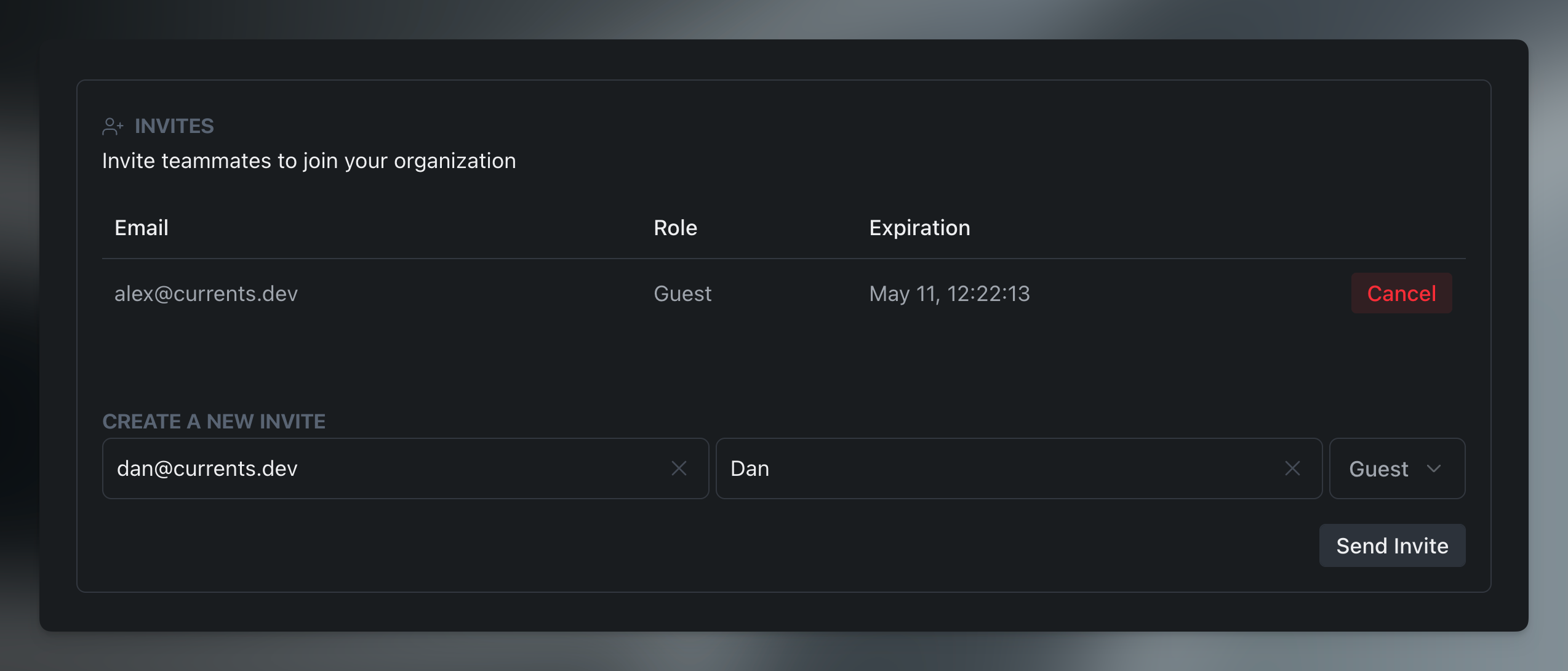
You can now add guests to your Currents organization without consuming a billable seat. This makes it easier to bring in stakeholders, reviewers, and cross-functional teammates while keeping paid seats reserved for people who need full write access.

  • Invite teammates as Guests even when billable seats are full
  • Keep billing and seat limits focused on billable members only

This should make it much easier to collaborate with engineering managers, QA leads, support teams, and other stakeholders who need visibility into test outcomes without taking up a paid seat.

Extra Usage Cap

Organization admins can now set a hard cap on how much extra usage is allowed beyond your plan limit before Currents pauses recording new results.

Extra Usage Cap

Organization admins can now set a hard cap on how much extra usage is allowed beyond your plan limit before Currents pauses recording new results.

  • Enable Limit Extra Usage in Billing & Usage
  • Set a cap as a percentage of your plan limit (e.g. 0%, 50%, 100%)
  • CI pipelines and test runners keep running — only recording pauses
  • Recording resumes automatically when the usage cycle resets, the cap is raised, or the plan is upgraded
  • Available now for all customers on extra usage plans

Enabling extra usage cap

Previously, exceeding your plan limit meant accumulating extra usage fees with no upper bound. With the new cap, you decide the ceiling up front — set it to 0% to stop the moment you hit your plan limit, or to 50% to allow a buffer (for example, up to 15,000 recordings on a 10,000 plan) before recording is paused.

When the cap is reached, your tests continue to run in CI without disruption — Currents simply stops ingesting new results until the next cycle, or until you adjust the cap or upgrade the plan.

This makes budgets predictable while keeping pipelines unaffected.

Discoverability for Currents Actions

Teams use Currents Actions to conditionally skip, tag, or quarantine tests, so PRs stay green and teams aren't blocked on known flakes or temporary exceptions.

Discoverability for Currents Actions

Teams use Currents Actions to conditionally skip, tag, or quarantine tests, so PRs stay green and teams aren't blocked on known flakes or temporary exceptions.

In this release we've made Actions easier to trust and debug by surfacing affected tests in two places.

  • On each Action, you can see which tests it hit in your chosen window, open recent executions, and tie them back to the commits they ran on.
  • Actions → Affected tests has a project-wide list of tests touched by Actions, with filters and a drill-down so you can see which Actions fired and when—without hopping or guessing.

See which tests each Action touches

  • Open any Action and scroll to Affected Tests to see tests that matched in your chosen time range
  • Tune the lookback window to focus on recent runs or a longer history
  • Expand a test to view recent executions where this Action applied

See all the tests affected by an Action

Open Actions → Affected tests for a project-wide view: every test that matched an Action in your lookback period, with the Actions that applied on each test in one place.

  • Use Action status and Action type filters to narrow to active rules, skips, quarantines, tags, or other behaviors you care about
  • Search by test title, spec file, or action name to jump to a specific case

This makes it easier for admins and contributors to reason about Actions in context: fewer surprises in CI and faster answers when someone asks, "which tests is this rule actually hitting?"

Stay ahead of action changes with Slack and Email notifications

Action Notifications help your change or approach expiration -- before surprises hit your pipeline.

Stay ahead of action changes with Slack and Email notifications

Action Notifications help your change or approach expiration -- before surprises hit your pipeline.

Configure delivery once per project, then get alerts in Slack, email, or both, only for the lifecycle events you care about.

  • Slack — Send to a single project channel (uses your existing Slack connection); pick which events trigger a message
  • Email — Notify the action creator, org admins, and actions admins, plus optional extra addresses; same event controls as Slack
  • Fine-grained events — Choose from creation, disable, re-enable, archive, expiring soon (advance warning before expiration), and expired
  • Where to configureActions → Settings in the dashboard, alongside the rest of action management (separate from run-level Slack notifications)
  • Available now for organizations using Actions

Open Actions → Settings, connect or confirm Slack if you use a channel, turn on Email if you want inbox alerts, then select events. Teams that rely on time-boxed quarantines or expiring skips can lean on expiring soon and expired so ownership and cleanup stay visible without manual polling.

Actions Admin Role

You can now delegate action management without granting full admin access. The new Actions Admin role gives team members the ability to create, edit, and…

Actions Admin Role

You can now delegate action management without granting full admin access. The new Actions Admin role gives team members the ability to create, edit, and delete Actions.

This role is ideal for QA leads, DevOps engineers, or team members who need to configure test actions without full administrative privileges. Admins can invite new members as Actions Admins or update existing member roles from the Organization Settings page.

Screenshot of Actions Admin role interface

Read more about permissions and roles

Test Suite Size Tracker

Introducing Test Suite Size, a new analytics view that helps you track how your test suite evolves over time. Whether you're expanding coverage, refactori…

Test Suite Size Tracker

Introducing Test Suite Size, a new analytics view that helps you track how your test suite evolves over time. Whether you're expanding coverage, refactoring tests, or debugging unexpected changes, this view gives you complete visibility into your test suite's composition.

  • Track unique test cases and spec files discovered across all CI runs
  • See exactly when and what tests were added or removed from your suite
  • Monitor test growth by branch, tag, or team with flexible grouping
  • Use rolling presence mode to smooth daily fluctuations from partial runs
  • Drill down into any period to see the specific tests that changed
  • Available now for all customers

Unlike run-level metrics that show tests per individual execution, Suite Size aggregates unique tests across all runs in each period. This means you get an accurate picture of your actual test coverage—not just what ran in a single CI job.

The expandable metrics table lets you click into any time period and see exactly which tests were newly detected or no longer running. Combined with grouping by Playwright tags, Git branches, or test groups, you can track coverage evolution across different parts of your codebase.

For teams with tests that don't run every day (scheduled tests, branch-specific tests, or selective execution), the Rolling Presence mode provides a stable view by counting tests seen within a configurable window—helping you distinguish real changes from normal variance.

Slack App Integration

Integrate Currents with Slack to receive real-time notifications and failure alerts directly in your team's channels.

Slack App Integration

Notify Team Members and Slack Groups about failures and flaky results

Integrate Currents with Slack to receive real-time notifications and failure alerts directly in your team's channels.

The new Slack App helps teams stay informed about test results without leaving their workflow.

  • Threaded run notifications that keep channels organized
  • Individual test notifications for failed or flaky tests
  • Annotation-based mentions to notify the right people from test code
  • UI-configured mention rules to route failures to the right teams
  • Flexible filtering by git branch, tags, test title, and file path
  • Up to 10 destinations per project with independent configuration
  • Available now for all customers
Currents Slack notification interface

Configure exactly when and how you're notified. Set up run notifications to alert on:

  • all runs
  • only failures, or
  • only flaky tests.

Add individual test notifications to get detailed failure context with error messages and direct links to the Currents dashboard.

Test and run notification configuration

Configure Test or Run Slack notifications

Route failures to the right people or teams using mention rules. Define conditions like test file path or tags, then specify who gets notified—by email, Slack handle, or user group.

Mention rules configuration

Mention test owners or teams when a test fails

You can also add notify:slack annotations directly in your test code to mention specific users when tests fail.

Playwright annotations for Slack

Use Playwright Annotations to configure Slack notifications

Multiple Reports

We’ve upgraded our automated reporting system to give you more flexibility and control! Previously, each project supported only a single automated report.…

Multiple Reports

We’ve upgraded our automated reporting system to give you more flexibility and control! Previously, each project supported only a single automated report. Now you can create and manage multiple reports within the same project — each with its own settings, schedule, and recipients.

✨ What’s New
  • Multiple Reports: Create as many automated reports as you need per project.
  • Custom Labels: Give each report a clear name — it will also appear as the email subject line.
  • Report Management: Easily enable, disable, or archive reports directly from the new Reports dashboard.