---
title: "Alternative to Microsoft Playwright Testing"
description: "Microsoft Playwright Testing vs Currents"
canonical: "https://currents.dev/posts/microsoft-vs-currents"
updated: "2025-03-17"
---

# Alternative to Microsoft Playwright Testing

Published 2025-03-17 by Currents Team.

Canonical URL: https://currents.dev/posts/microsoft-vs-currents

Microsoft Playwright Testing vs Currents

---


<Note type="warning" className="mt-4">
  <div>
    **Update**: MPT will be [shut down on March 8th,
    2026](https://github.com/Azure/playwright-workspaces/issues/23#issuecomment-3269404081).
    Microsoft is asking people to migrate to its new service **Playwright
    Workspaces**, which lacks reporting and analytics.
  </div>
  <div className="inline-block">
    <Button
      flat
      href="/posts/microsoft-workspaces-vs-currents"
      className="hover:no-underline"
      variant="warning"
    >
      <span>Learn about Playwright Workspaces</span>
    </Button>
  </div>
</Note>

When running Playwright tests, teams often choose between Currents and Microsoft Playwright Testing (MPT). Both tools help with test execution and reporting, but they work differently and come with different pricing models.

In this article, we’ll compare the two, highlighting their strengths, differences, and how they can even be used together.

## **Overview**

### **Microsoft Playwright Testing is still in Public Preview**

Microsoft Playwright Testing (MPT) is a cloud-based service that provides remote browser execution on Azure infrastructure. It allows teams to run Playwright tests using Microsoft-hosted browsers and reports results to an Azure-hosted dashboard.

As of March 2025, Microsoft Playwright Testing is in public preview, meaning it is still evolving and may not yet include all the features teams need for large-scale test management. Currently, it does not provide built-in analytics or test history tracking. While it enables remote browser execution, teams relying on detailed insights into test flakiness, performance trends, or failure categorization may need to supplement it with additional tools.

<LightboxCarousel
  slides={[
    {
      type: "image",
      src: "/img/posts/microsoft-vs-currents/1-mpt-resource-groups.png",
      description: "Azure: Resource Groups",
    },

    {
      type: "image",
      src: "/img/posts/microsoft-vs-currents/2-mpt-resource-group.png",
      description: "Azure: Resource Group",
    },
    {
      type: "image",
      src: "/img/posts/microsoft-vs-currents/3-mpt-playwright.png",
      description: "Azure: Playwright",
    },
    {
      type: "image",
      src: "/img/posts/microsoft-vs-currents/4-mpt-instructions.png",
      description: "MPT: Setup Instructions",
    },
    {
      type: "image",
      src: "/img/posts/microsoft-vs-currents/5-mpt-runs.png",
      description: "MPT: Runs",
    },
    {
      type: "image",
      src: "/img/posts/microsoft-vs-currents/6-mpt-specs.png",
      description: "MPT: Run Specs",
    },
    {
      type: "image",
      src: "/img/posts/microsoft-vs-currents/7-mpt-steps.png",
      description: "MPT: Run Steps",
    },
    {
      type: "image",
      src: "/img/posts/microsoft-vs-currents/8-mpt-attachments.png",
      description: "MPT: Run Attachments",
    },
    {
      type: "image",
      src: "/img/posts/microsoft-vs-currents/9-mpt-errors.png",
      description: "MPT: Run Errors",
    },

]}
/>

#### **How it Works**

1. Playwright runs on your CI/CD pipeline.
2. Playwright connects to remote Azure-hosted browsers.
3. These browsers load the application under test and execute the tests.
4. Test results are collected in an Azure-hosted dashboard.

### **Currents**

Currents is a cloud-based test observability platform designed to optimize test execution. It is particularly effective for managing large test suites and ensuring their reliability over time. Currents is designed as a test observability platform that integrates with existing CI/CD pipelines. It provides analytics, test orchestration, and historical insights—capabilities that Microsoft Playwright Testing does not currently include.

<LightboxCarousel
  slides={[
    {
      type: "image",
      src: "/img/posts/dashboard/runs.png",
      description: "Runs",
    },
    {
      type: "image",
      src: "/img/posts/dashboard/run-details.png",
      description: "Run Details",
    },
    {
      type: "image",
      src: "/img/posts/dashboard/run-live-results.png",
      description: "Run Live Results",
    },
    {
      type: "image",
      src: "/img/posts/dashboard/run-specs.png",
      description: "Run Specs",
    },
    {
      type: "image",
      src: "/img/posts/dashboard/run-spec-tests.png",
      description: "Run Spec Tests",
    },
    {
      type: "image",
      src: "/img/posts/dashboard/test-drawer.png",
      description: "Test Details",
    },
    {
      type: "image",
      src: "/img/posts/dashboard/test-drawer-attempt-error-details.png",
      description: "Test Details: Attempt Error Details",
    },
    {
      type: "image",
      src: "/img/posts/dashboard/test-drawer-attempt-screenshots.jpg",
      description: "Test Details: Attempt Screenshots",
    },
    {
      type: "image",
      src: "/img/posts/dashboard/test-drawer-attempt-videos.jpg",
      description: "Test Details: Attempt Videos",
    },
    {
      type: "image",
      src: "/img/posts/dashboard/test-drawer-attempt-steps.png",
      description: "Test Details: Attempt Steps",
    },
    {
      type: "image",
      src: "/img/posts/dashboard/test-drawer-attempt-visual-diff.png",
      description: "Test Detail: Attempt Visual Testing",
    },
    {
      type: "image",
      src: "/img/posts/dashboard/test-drawer-attempt-attachments.png",
      description: "Test Detail: Attempt Attachments",
    },
    {
      type: "image",
      src: "/img/posts/dashboard/test-drawer-console.png",
      description: "Test Detail: Console",
    },
    {
      type: "image",
      src: "/img/posts/dashboard/test-drawer-metrics.png",
      description: "Test Detail: Metrics",
    },
    {
      type: "image",
      src: "/img/posts/dashboard/test-drawer-annotations.png",
      description: "Test Detail: Annotations",
    },
    {
      type: "image",
      src: "/img/posts/dashboard/analytics-run-status.png",
      description: "Analytics: Run Status",
    },
    {
      type: "image",
      src: "/img/posts/dashboard/analytics-run-duration.png",
      description: "Analytics: Run Duration",
    },
    {
      type: "image",
      src: "/img/posts/dashboard/analytics-run-completion.png",
      description: "Analytics: Run Completion",
    },
    {
      type: "image",
      src: "/img/posts/dashboard/analytics-suite-size.png",
      description: "Analytics: Suite Size",
    },
    {
      type: "image",
      src: "/img/posts/dashboard/analytics-test-results.png",
      description: "Analytics: Test Results",
    },
    {
      type: "image",
      src: "/img/posts/dashboard/analytics-test-flakiness.png",
      description: "Analytics: Test Flakiness",
    },
    {
      type: "image",
      src: "/img/posts/dashboard/analytics-code-coverage.png",
      description: "Analytics: Code Coverage",
    },
    {
      type: "image",
      src: "/img/posts/dashboard/spec-explorer.png",
      description: "Explorer: Specs",
    },
    {
      type: "image",
      src: "/img/posts/dashboard/test-explorer.png",
      description: "Explorer: Tests",
    },
    {
      type: "image",
      src: "/img/posts/dashboard/error-explorer.png",
      description: "Explorer: Errors",
    },
  ]}
/>

#### **How it Works**

1. Playwright runs on your own CI/CD pipeline.
2. Currents [orchestrates test execution to optimize parallel runs](https://docs.currents.dev/guides/parallelization-guide/pw-parallelization/playwright-orchestration).
3. Playwright uses browsers running on your CI (or remote browsers if used together with MPT).
4. Test results are collected in the Currents dashboard.

## **Understanding the Total Cost of Ownership**

Microsoft Playwright Testing is part of Azure DevOps, where you'll deal with:

- Managing IAM policies
- Managing resource groups
- Managing security settings
- [Paid support](https://azure.microsoft.com/en-us/support/plans/)
- [Evolving documentation](https://learn.microsoft.com/en-us/azure/playwright-testing/)

For teams already using Azure DevOps, this integration may be seamless, while others may find it adds additional setup steps.

Whereas with Currents, you get:

- Simple adoption
- Seamlessly integration with existing CI/CD
- Automatic scaling with test suite growth
- Top-notch support included
- [Extensive documentation](https://docs.currents.dev/)

## **Feature Comparison: Microsoft Playwright Testing vs. Currents**

### 1. **Analytics**

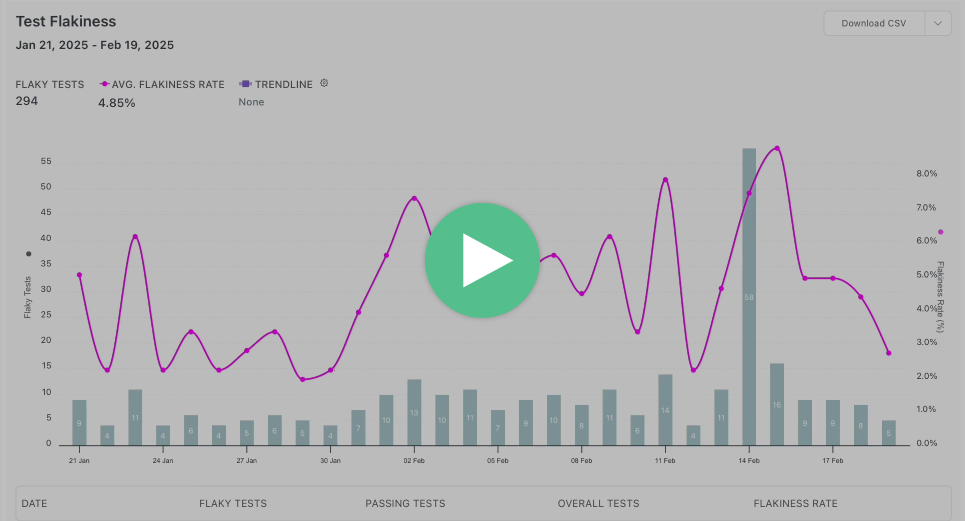
**MPT:** While it provides access to test results, steps, and errors, it lacks analytics capabilities such as test flakiness rates, historical trends, or actionable insights into the overall test suite.

**Currents:** Provides in-depth test analytics, including flaky test detection, historical trends, and performance insights. These features are crucial for teams managing large test suites, as they help track test reliability over time, identify problem areas, and maintain a high level of test health. Currents also helps teams cut down on unnecessary test executions and improve efficiency by detecting and addressing flaky tests early.

<Lightbox
  slides={[
    {
      type: "video",
      description: "Step-level details",
      sources: [
        {
          src: "/img/posts/allure-vs-currents/analytics.mp4",
          type: "video/mp4",
        },
      ],
    },
  ]}
>
  <img src="/img/posts/allure-vs-currents/analytics-thumb.png" />
</Lightbox>

Test analytics drive decision-making and help teams maintain reliable test suites with optimized CI performance:

| Category                  | Microsoft Playwright Testing                                                 | Currents                                                                     |
| ------------------------- | ---------------------------------------------------------------------------- | ---------------------------------------------------------------------------- |
| Historical Data           | [90 days](https://azure.microsoft.com/pt-br/products/playwright-testing#FAQ) | [12 months](https://docs.currents.dev/resources/data-privacy/data-retention) |
| Flaky Test Detection      | Automated                                                                    | [Automated](https://docs.currents.dev/dashboard/tests/flaky-tests)           |
| Test Execution Statistics | ❌                                                                           | [Advanced](https://docs.currents.dev/dashboard/insights-and-analytics)       |
| Trend Analysis            | ❌                                                                           | Automated                                                                    |
| Failure Categorization    | ❌                                                                           | [Tags](https://docs.currents.dev/dashboard/runs/tags)                        |
| Code Coverage             | ❌                                                                           | ✅                                                                           |
| Performance Analysis      | ❌                                                                           | ✅                                                                           |
| Team Analytics            | ❌                                                                           | ✅                                                                           |

### 2. **Integrations**

<Lightbox
  slides={[
    {
      src: "/img/posts/microsoft-vs-currents/integrations.png",
      alt: "Integrations",
    },
  ]}
>
  <img
    src="/img/posts/microsoft-vs-currents/integrations.png"
    alt="Integrations"
    style={{ borderRadius: 10 }}
  />
</Lightbox>

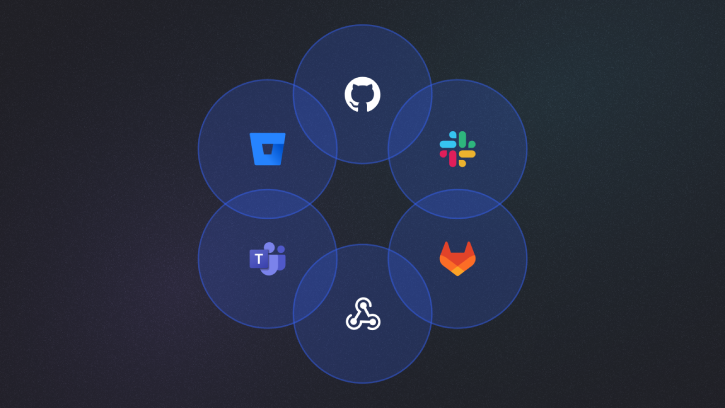
**MPT:** Does not integrate with any 3rd-party tools. No webhooks or API support.

**Currents:** Native integrations with Jira, GitHub, GitLab, BitBucket, Slack and MS Teams. Run notifications on Pull Requests or straight to #team channel helps teams stay on top of their tests. Webhooks and API access allow users to build their own custom integrations.

### 3. **Test Orchestration and Parallelization**

**MPT:** Provides high parallelization by running tests on cloud-hosted browsers. Up to 50 parallel browsers are supported. As of now, you cannot opt-out of using remote browsers, although it seems to be in the works.

**Currents:** Offers multiple optimized [parallel execution strategies](https://docs.currents.dev/guides/ci-optimization/playwright-parallelization), including intelligent [test orchestration](https://docs.currents.dev/guides/parallelization-guide/pw-parallelization/playwright-orchestration) and running [CI Tests on Spot Instances](https://docs.currents.dev/guides/parallelization-guide/pw-parallelization/ci-tests-on-spot-instances). This feature ensures efficient use of resources and reduced test run times by distributing tests smartly across available CI infrastructure.

## **Feature Comparison Table**

Here's a detailed comparison of how these two solutions stack up against each other:

| Category                           | Microsoft Playwright Testing                                                                                                                                                                                                                | Currents                                                                                                                                                                                                                                                                                                                                                                                                                                                                                                                                                                                                                                                                                                                                                                                                                                                                    |
| ---------------------------------- | ------------------------------------------------------------------------------------------------------------------------------------------------------------------------------------------------------------------------------------------- | --------------------------------------------------------------------------------------------------------------------------------------------------------------------------------------------------------------------------------------------------------------------------------------------------------------------------------------------------------------------------------------------------------------------------------------------------------------------------------------------------------------------------------------------------------------------------------------------------------------------------------------------------------------------------------------------------------------------------------------------------------------------------------------------------------------------------------------------------------------------------- |
| **Setup & Integration**            | <ul><li>Single package installation</li><li>Playwright only</li><li>Minimal configuration needed</li><li>Automatic artifact collection</li></ul>                                                                                            | <ul><li>Single package installation</li><li>Native support for multiple frameworks</li><li>Minimal configuration needed</li><li>Automatic artifact collection</li></ul>                                                                                                                                                                                                                                                                                                                                                                                                                                                                                                                                                                                                                                                                                                     |
| **Test Execution and Performance** | <ul><li>Remote-browser test execution</li><li>Up to 50 parallel browsers</li><li>No retry support</li></ul>                                                                                                                                 | <ul><li>[Advanced test orchestration](https://docs.currents.dev/guides/parallelization-guide/pw-parallelization/playwright-orchestration)</li><li>[Smart test distribution](https://docs.currents.dev/guides/parallelization-guide/load-balancing)</li><li>[Playwright Sharding](https://docs.currents.dev/guides/parallelization-guide/pw-parallelization/playwright-sharding)</li><li>[Re-run only failed tests](https://docs.currents.dev/guides/re-run-only-failed-tests)</li>[Running Failed Specs First](https://docs.currents.dev/guides/ci-optimization/load-balancing#optimal-sorting-by-the-failure-rate)<li>[Fail-Fast Strategy](https://docs.currents.dev/guides/parallelization-guide/fail-fast-strategy)</li><li>[CI Tests on Spot Instances](https://docs.currents.dev/guides/parallelization-guide/pw-parallelization/ci-tests-on-spot-instances)</li></ul> |
| **Reporting**                      | <ul><li>Post-execution reports</li><li>Flaky test detection</li></ul>                                                                                                                                                                       | <ul><li>[Real-time test results streaming](https://docs.currents.dev/guides/parallelization-guide/pw-parallelization/step-level-reporting)</li><li>[Flaky test detection](https://docs.currents.dev/dashboard/tests/flaky-tests)</li><li>[Automated email reports](https://docs.currents.dev/dashboard/automated-reports)</li></ul>                                                                                                                                                                                                                                                                                                                                                                                                                                                                                                                                         |
| **Debug Capabilities**             | <ul><li>Interactive trace viewer</li><li>Step-by-step execution logs</li><li>Artifacts</li><li>Network logs and console data</li></ul>                                                                                                      | <ul><li>Interactive trace viewer</li><li>Step-by-step execution logs</li><li>Artifacts</li><li>Network logs and console data</li></ul>                                                                                                                                                                                                                                                                                                                                                                                                                                                                                                                                                                                                                                                                                                                                      |
| **Analytics**                      | <ul><li>None</li></ul>                                                                                                                                                                                                                      | <ul><li>[Trend analysis and insights](https://docs.currents.dev/dashboard/insights-and-analytics)</li><li>[Code Coverage](https://docs.currents.dev/guides/coverage)</li><li>Performance bottleneck analysis</li></ul>                                                                                                                                                                                                                                                                                                                                                                                                                                                                                                                                                                                                                                                      |
| **Workflow Automation**            | <ul><li>No built-in automation</li><li>[GitHub CI/CD](https://learn.microsoft.com/en-us/azure/playwright-testing/quickstart-automate-end-to-end-testing?tabs=github&pivots=playwright-test-runner#update-the-workflow-definition)</li></ul> | <ul><li>[Currents Actions](https://docs.currents.dev/guides/currents-actions)</li><li>[CI/CD integrations](https://docs.currents.dev/getting-started/ci-setup)</li><li>[API Access](https://docs.currents.dev/api)</li><li>[Webhooks](https://docs.currents.dev/resources/integrations/http-webhooks)</li></ul>                                                                                                                                                                                                                                                                                                                                                                                                                                                                                                                                      |
| **Team Collaboration**             | <ul><li>Real-time team access</li><li>Shared dashboards</li><li>No 3rd-party integrations</li></ul>                                                                                                                                         | <ul><li>Real-time team access</li><li>Shared dashboards</li><li>Notes</li><li>Jira integration</li><li>Slack integration</li><li>MS Teams integration</li><li>GitHub integration</li><li>GitLab integration</li><li>BitBucket integration</li></ul>                                                                                                                                                                                                                                                                                                                                                                                                                                                                                                                                                                                                                         |
| **Security**                       | <ul><li>[Azure-backed security & compliance](https://learn.microsoft.com/en-us/azure/compliance/)</li><li>SSO/SAML integration</li><li>Secure artifact storage</li><li>Role-based access</li></ul>                                          | <ul><li>[SOC 2 Type 2 compliance](https://currents.dev/security)</li><li>[SSO/SAML integration](https://docs.currents.dev/dashboard/administration/sso-saml2.0)</li><li>Secure artifact storage</li><li>Role-based access</li></ul>                                                                                                                                                                                                                                                                                                                                                                                                                                                                                                                                                                                                                                         |
| **Infrastructure**                 | <ul><li>Cloud-based platform</li><li>Zero maintenance</li><li>Automatic scaling</li><li>Built-in redundancy</li></ul>                                                                                                                       | <ul><li>Cloud-based platform</li><li>Zero maintenance</li><li>Automatic scaling</li><li>Built-in redundancy</li></ul>                                                                                                                                                                                                                                                                                                                                                                                                                                                                                                                                                                                                                                                                                                                                                       |
| **Cost Model**                     | <ul><li>Usage-based</li><li>Pays for test execution time + amount of tests reported</li><li>Includes all features</li><li>Support starts at $29/mo</li></ul>                                                                                | <ul><li>Subscription-based</li><li>Predictable pricing</li><li>Includes all features</li><li>Support included</li></ul>                                                                                                                                                                                                                                                                                                                                                                                                                                                                                                                                                                                                                                                                                                                                                     |

## **Making the Right Choice**

**When to Choose Microsoft Playwright Testing:** MPT may be the right choice for teams that are already using Azure and want to keep everything within that ecosystem. It works best for teams with smaller test suites that don’t require advanced analytics or test history tracking. Since MPT is still in beta, it’s better suited for those comfortable using an early-stage product with evolving features and potential limitations.

**When to Choose Currents:** Currents is a better fit for teams managing larger test suites and needing to maintain their reliability with powerful analytics. It provides deep insights into test health, detects flaky tests, and helps teams improve execution times through optimized parallelization. Teams looking for a stable, battle-tested platform with predictable pricing, great documentation, and excellent support will find Currents a better long-term solution.

<Note>
  <strong>Customer Case:</strong>{" "}
  <a href="/posts/currents-and-planable" target="_blank">
    {"How Planable Transformed Test Automation Efficiency with Currents"}
  </a>
</Note>

This analysis demonstrates that while both tools serve testing needs, they target different organizational priorities and capabilities for the organization. Consider your team's specific requirements, growth trajectory, and resource constraints when making this such an important decision.

## **Using Currents and Microsoft Playwright Testing Together**

Currents and MPT are not mutually exclusive. If you need remote browsers for test execution, you can use MPT while still leveraging Currents for optimized test orchestration, reporting and analytics. This hybrid approach allows you to:

- Run Playwright tests on Azure-hosted browsers via MPT.
- Use Currents to orchestrate test execution efficiently.
- Store and analyze test results using the Currents dashboard.

## **Conclusion**

Backed by Microsoft and the Playwright team, Microsoft Playwright Testing is a promising solution. However, as it is still in public preview, it has some big feature gaps compared to more established test management platforms. Currents, on the other hand, is already a stable, well-supported platform designed to help teams manage large test suites effectively. It will be exciting to see how both products evolve in the coming years and what new innovations they bring to the world of Playwright testing.