---
title: "Alternative to Allure Report for Playwright Testing"
description: "Allure Report vs Currents"
canonical: "https://currents.dev/posts/allure-vs-currents"
updated: "2025-02-17"
---
# Alternative to Allure Report for Playwright Testing
Published 2025-02-17 by Currents Team.
Canonical URL: https://currents.dev/posts/allure-vs-currents
Allure Report vs Currents
---
Modern test automation frameworks demand robust reporting solutions that provide comprehensive insights into test execution and help teams maintain high-quality applications. As Playwright continues to establish itself as a leading testing framework, various solutions have emerged for teams looking to speed up and better manage their test suite. In this article, you’ll find a detailed comparison between **Currents** and **Allure Report.**
**Allure Report:** A popular open-source framework offering flexible and customizable reporting for various testing frameworks. It provides detailed HTML reports with categorized test results, attachments, and history.
**Currents:** A cloud-based test observability platform that integrates with your CI pipeline to optimize test execution, provides real-time insights, and enhances team productivity. While offering best-in-class integration with Playwright, Currents also supports Cypress, Jest, and other testing frameworks.
The increase in complexity in web applications has made detailed test reporting an essential component of the development lifecycle. With Playwright's capabilities expanding across multiple browsers and platforms, teams require sophisticated reporting mechanisms that can effectively communicate test results while maintaining rapid development cycles.
Let's analyze how Allure Report and Currents address these evolving needs.
## **Understanding the Total Cost of Ownership**
### **Infrastructure Requirements**
Infrastructure management is crucial for maintaining efficient test reporting systems. Let's examine how both tools approach this challenge.
Allure Report operates on a traditional self-hosted model, requiring teams to:
- Maintain their own infrastructure for report storage
- Set up CI/CD pipelines for report generation
- Configure data retention policies
- Manage scaling as test suites grow
Whereas Currents uses a cloud-native approach, it offers:
- Zero infrastructure maintenance
- Automatic scaling with test suite growth
- Built-in data retention and management
- Instant availability of reports across teams
### **Resource Utilization**
The impact of test reporting tools on CI/CD resources significantly affects overall testing efficiency and cost.
| Category | Allure | Currents |
| ----------- | ---------------------------------------------------------------------------------------------------------------------- | ----------------------------------------------------------------------------------------------------------------------------------------------------------------------------------------------------------------------------------------------------------------------------------------------------------------------------------------------------- |
| Processing | - Local processing overhead for report generation
- Limited parallel test execution capabilities
| - [Intelligent test distribution and sharding](https://docs.currents.dev/guides/ci-optimization/playwright-parallelization)
- [Advanced test orchestration with CI performance boost ⚡](https://docs.currents.dev/guides/parallelization-guide/pw-parallelization/playwright-orchestration)
- Parallel artifact processing
|
| Storage | - Additional storage requirements
| - Stored in the Cloud
- Streaming data architecture
|
| Maintenance | | |
## **Feature Comparison: Currents vs. Allure Report**
### **Debugging Capabilities**
Test execution visibility and quick issue resolution are critical for maintaining efficient CI pipelines and rapid development cycles.
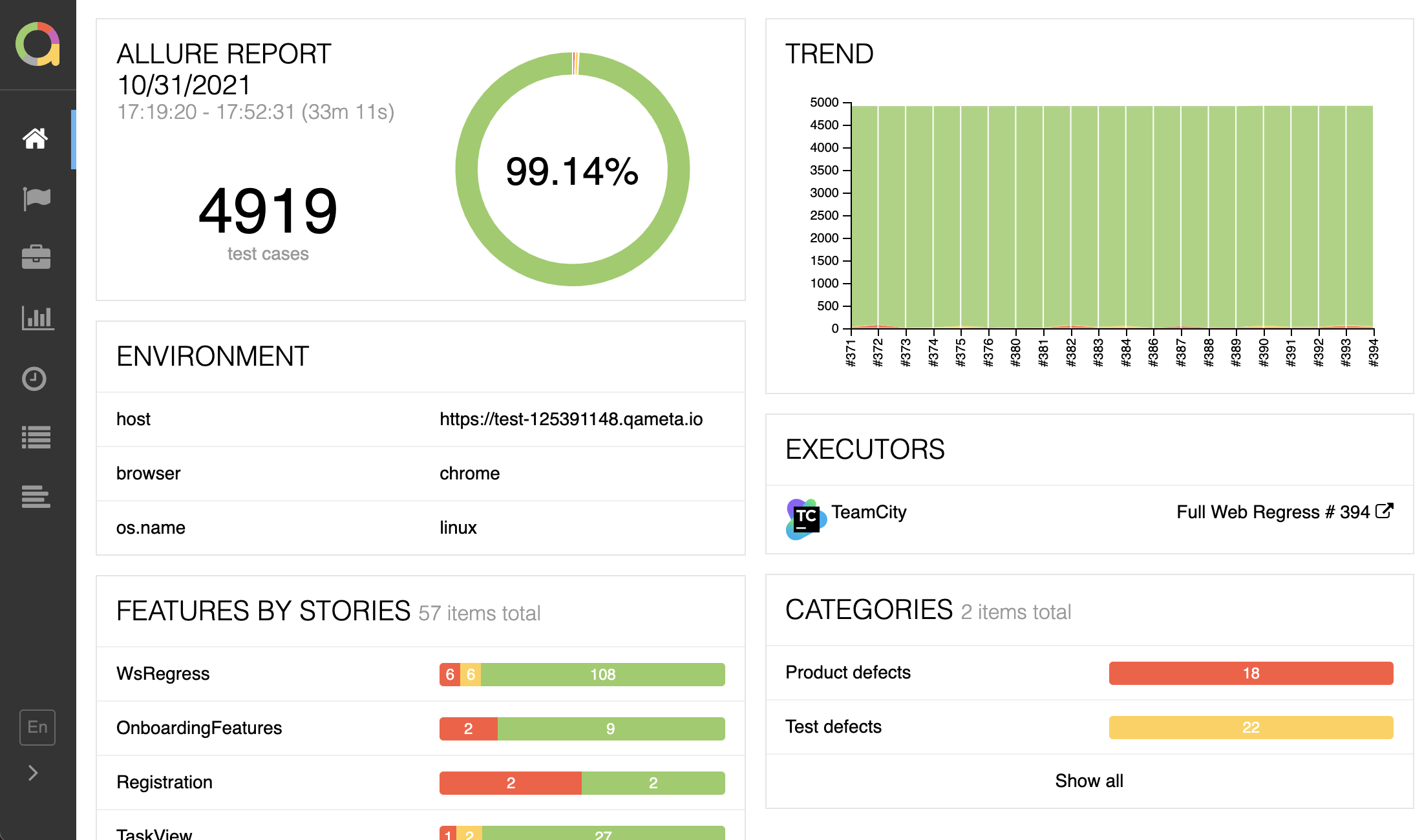 **Allure**: Reports become available after test execution completes, with basic artifact viewing capabilities. Teams must manually correlate failures and rely on local debugging tools, which can slow down issue resolution.
**Currents**: Provides comprehensive test execution details:
- Step-by-step test execution history with detailed logs
- Rich artifact management including screenshots, videos, and network logs
- Interactive trace viewer for rapid debugging
- Real-time test execution monitoring with instant failure notifications
- Automated email reports with customizable schedules for team updates
- Historical test stability tracking with detailed analytics
- Test retry analysis and flaky test identification
### **Analytics and Insights**
**Allure**: Reports become available after test execution completes, with basic artifact viewing capabilities. Teams must manually correlate failures and rely on local debugging tools, which can slow down issue resolution.
**Currents**: Provides comprehensive test execution details:
- Step-by-step test execution history with detailed logs
- Rich artifact management including screenshots, videos, and network logs
- Interactive trace viewer for rapid debugging
- Real-time test execution monitoring with instant failure notifications
- Automated email reports with customizable schedules for team updates
- Historical test stability tracking with detailed analytics
- Test retry analysis and flaky test identification
### **Analytics and Insights**
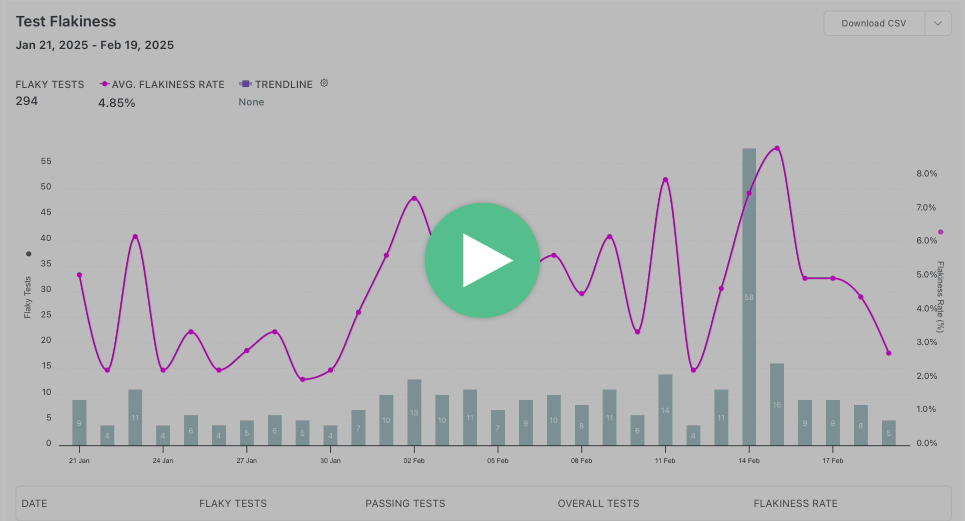 Test analytics drive decision-making and help teams maintain reliable test suites with optimized CI performance:
| Category | Allure | Currents |
| ------------------------- | ---------------------------------------------------------------------- | ---------------------------------------------------------------------------- |
| Test Execution Statistics | [Basic](https://allurereport.org/docs/visual-analytics/) | [Advanced](https://docs.currents.dev/dashboard/insights-and-analytics) |
| Trend Analysis | Manual | Automated |
| Historical Data | Limited | [12 months](https://docs.currents.dev/resources/data-privacy/data-retention) |
| Failure Categorization | [Categories](https://allurereport.org/docs/categories/) | [Tags](https://docs.currents.dev/dashboard/runs/tags) |
| Flaky Test Detection | [Automated](https://allurereport.org/docs/test-stability/#flaky-tests) | [Automated](https://docs.currents.dev/dashboard/tests/flaky-tests) |
| Code Coverage | ❌ | ✅ |
| Performance Analysis | ❌ | ✅ |
| Team Analytics | ❌ | ✅ |
### **Team Collaboration Features**
One key aspect of Test automation is to have visibility of test coverage across different teams, which makes team collaboration crucial for modern testing workflows:
| Category | Allure | Currents |
| ------------------ | ------------------------------- | -------------------------------------------------- |
| Report Sharing | Via file system | Instant cloud access to test results and artifacts |
| Access Control | Manual distribution processes | Role-based access control with SSO support |
| Team Collaboration | Team-specific report generation | Cross-team collaboration through shared dashboards |
| Real-time Features | Limited real-time visibility | Integrated communication features |
## **Feature Comparison Table**
Here's a detailed comparison of how these two solutions stack up against each other:
| Category | Allure Report | Currents |
| ---------------------------------- | --------------------------------------------------------------------------------------------------------------------------------------------------------------------------------------------------------------------- | ----------------------------------------------------------------------------------------------------------------------------------------------------------------------------------------------------------------------------------------------------------------------------------------------------------------------------------------------------------------------------------------------------------------------------------------------------------------------------------------------------------------------------------------------------------------------------------------------------------------------------------------------------------------------------------------------------------------------------------------------------------------------------------------------------------------------------------------------------------------------------------------------------------------- |
| **Setup & Integration** |
Test analytics drive decision-making and help teams maintain reliable test suites with optimized CI performance:
| Category | Allure | Currents |
| ------------------------- | ---------------------------------------------------------------------- | ---------------------------------------------------------------------------- |
| Test Execution Statistics | [Basic](https://allurereport.org/docs/visual-analytics/) | [Advanced](https://docs.currents.dev/dashboard/insights-and-analytics) |
| Trend Analysis | Manual | Automated |
| Historical Data | Limited | [12 months](https://docs.currents.dev/resources/data-privacy/data-retention) |
| Failure Categorization | [Categories](https://allurereport.org/docs/categories/) | [Tags](https://docs.currents.dev/dashboard/runs/tags) |
| Flaky Test Detection | [Automated](https://allurereport.org/docs/test-stability/#flaky-tests) | [Automated](https://docs.currents.dev/dashboard/tests/flaky-tests) |
| Code Coverage | ❌ | ✅ |
| Performance Analysis | ❌ | ✅ |
| Team Analytics | ❌ | ✅ |
### **Team Collaboration Features**
One key aspect of Test automation is to have visibility of test coverage across different teams, which makes team collaboration crucial for modern testing workflows:
| Category | Allure | Currents |
| ------------------ | ------------------------------- | -------------------------------------------------- |
| Report Sharing | Via file system | Instant cloud access to test results and artifacts |
| Access Control | Manual distribution processes | Role-based access control with SSO support |
| Team Collaboration | Team-specific report generation | Cross-team collaboration through shared dashboards |
| Real-time Features | Limited real-time visibility | Integrated communication features |
## **Feature Comparison Table**
Here's a detailed comparison of how these two solutions stack up against each other:
| Category | Allure Report | Currents |
| ---------------------------------- | --------------------------------------------------------------------------------------------------------------------------------------------------------------------------------------------------------------------- | ----------------------------------------------------------------------------------------------------------------------------------------------------------------------------------------------------------------------------------------------------------------------------------------------------------------------------------------------------------------------------------------------------------------------------------------------------------------------------------------------------------------------------------------------------------------------------------------------------------------------------------------------------------------------------------------------------------------------------------------------------------------------------------------------------------------------------------------------------------------------------------------------------------------- |
| **Setup & Integration** | - Requires multiple dependencies
- Manual plugin configuration
- Additional setup for artifacts
- Framework-specific adapters needed
| - Single package installation
- Native support for multiple frameworks
- Minimal configuration needed
- Automatic artifact collection
|
| **Test Execution and Performance** | - Basic test execution
- Manual distribution setup
- Limited parallel execution
- [No retry support](https://allurereport.org/docs/history-and-retries/#retrying-tests-from-allure)
| - [Advanced test orchestration](https://docs.currents.dev/guides/parallelization-guide/pw-parallelization/playwright-orchestration)
- [Smart test distribution](https://docs.currents.dev/guides/parallelization-guide/load-balancing)
- [Playwright Sharding](https://docs.currents.dev/guides/parallelization-guide/pw-parallelization/playwright-sharding)
- Up to 40% faster CI execution
- [Re-run only failed tests](https://docs.currents.dev/guides/re-run-only-failed-tests)
[Running Failed Specs First](https://docs.currents.dev/guides/ci-optimization/load-balancing#optimal-sorting-by-the-failure-rate)- [Fail-Fast Strategy](https://docs.currents.dev/guides/parallelization-guide/fail-fast-strategy)
- [CI Tests on Spot Instances](https://docs.currents.dev/guides/parallelization-guide/pw-parallelization/ci-tests-on-spot-instances)
|
| **Reporting** | - Post-execution reports
- Static HTML output
- Manual report generation
- Basic report customization
| - [Real-time test results streaming](https://docs.currents.dev/guides/parallelization-guide/pw-parallelization/step-level-reporting)
- [Flaky test detection](https://docs.currents.dev/dashboard/tests/flaky-tests)
- Interactive dashboards
- [Automated email reports](https://docs.currents.dev/dashboard/automated-reports)
|
| **Debug Capabilities** | - Static log viewing
- Basic screenshot access
- Manual log correlation
- Limited debug info
| - Interactive trace viewer
- Step-by-step execution logs
- Video/screenshot integration
- Network logs and console data
|
| **Analytics** | - [Basic execution statistics](https://allurereport.org/docs/visual-analytics/)
- Manual trend analysis
- Basic history tracking
| - [Trend analysis and insights](https://docs.currents.dev/dashboard/insights-and-analytics)
- [Code Coverage](https://docs.currents.dev/guides/coverage)
- Performance bottleneck analysis
|
| **Workflow Automation** | - No built-in automation
- Manual workflow management
- Basic CI integration
| - [Currents Actions](https://docs.currents.dev/guides/currents-actions)
- [CI/CD integrations](https://docs.currents.dev/getting-started/ci-setup)
|
| **Team Collaboration** | - File-based sharing
- Manual result distribution
- Limited collaboration
| - Real-time team access
- Shared dashboards
- Notes
- Jira integration
- Slack integration
- MS Teams integration
- GitHub integration
- GitLab integration
- BitBucket integration
|
| **Security** | - Self-managed security
- Custom access controls
- Manual compliance
- Local data protection
| - [SOC 2 Type 2 compliance](https://currents.dev/security)
- [SSO/SAML integration](https://docs.currents.dev/dashboard/administration/sso-saml2.0)
- Secure artifact storage
- Role-based access
|
| **Infrastructure** | - Self-hosted setup
- Manual maintenance
- Manual scaling
- Custom redundancy needed
| - Cloud-based platform
- Zero maintenance
- Automatic scaling
- Built-in redundancy
|
| **Cost Model** | - Open-source
- Infrastructure costs
- Maintenance overhead
- Support costs extra
| - Subscription-based
- Predictable pricing
- Includes all features
- Support included
|
## **Enterprise Considerations**
### **Security and Compliance**
Security considerations vary significantly:
| Category | Allure | Currents |
| ------------------- | -------------------------------------------------- | -------------------------------------------------------------------------------------------------------------------- |
| Security Management | | |
| Access Control | | - SSO integration (SAML, OAuth)
- Role-based access control
|
| Compliance | - Manual compliance implementation
| - Regular security assessments
- Automated security scanning
|
| Data Protection | | - End-to-end encryption
- Secure artifact storage
- Configurable data retention policies
|
| Monitoring | | - Security portal at [https://compliance.currents.dev](https://compliance.currents.dev)
|
### **Scalability Factors**
As test suites grow, scalability becomes crucial:
| Category | Allure's Scaling | Currents' Architecture |
| -------------- | ------------------------------------------------------ | -------------------------------------------------- |
| Infrastructure | Manual infrastructure scaling | Automatic cloud scaling |
| Resources | Resource-intensive report generation | Efficient resource utilization |
| Processing | Limited parallel processing | Parallel processing capabilities |
| Storage | Storage management challenges | Unlimited storage capacity |
## **Making the Right Choice**
While both tools have their different advantages, choosing between these two highly depends on specific organizational needs and constraints.
**When to Choose Allure:** Organizations requiring complete infrastructure control and on-premises data storage may find Allure suitable. Teams with smaller test suites and basic reporting needs can benefit from its simplicity. However, teams need to handle infrastructure management and scaling challenges while opting for allure and native Playwright reports can also fulfil these needs to an extent.
**When to Choose Currents:** Growing organizations needing scalable solutions benefit from Currents' cloud architecture. Teams requiring real-time collaboration and advanced analytics find its features invaluable. Resource optimization and automated management reduce operational overhead, making it ideal for modern development practices.
Customer Case:{" "}
{"How Planable Transformed Test Automation Efficiency with Currents"}
This analysis demonstrates that while both tools serve testing needs, they target different organizational priorities and capabilities for the organization. Consider your team's specific requirements, growth trajectory, and resource constraints when making this such an important decision.
## **Why Currents Stands Out for Playwright Testing**
While both solutions offer valuable features, Currents demonstrates particular strengths for teams using Playwright.
**Native Support:** With Currents native integration to Playwright, it understands how to leverage that framework's strengths and capabilities. This specialized focus helps in more efficient workflows and better utilization of Playwright's native features.
**Enhanced Team Collaboration:** The cloud-based approach eliminates the need for complex infrastructure while enabling seamless collaboration. Team members can access test results, debug information, and historical data from anywhere, making it easier to work across different locations and time zones.
**Superior Performance Management:** With built-in test orchestration and flaky test detection, Currents helps teams maintain faster, more reliable test suites. The platform's ability to automatically distribute tests and identify stability issues saves valuable time and resources.
## **Conclusion**
Currents is a great option for businesses which are using Playwright for their test automation needs, while Allure Report is a good choice for teams searching for a free general-purpose reporting solution. Currents' cloud-native architecture and integrated collaboration features help development teams optimize their testing workflows and reduce operational overhead.
The particular requirements of your team will determine which of these tools is best for you. If you are looking for a free, locally hosted solution with a lot of customization options, Allure Report would be the best fit. However, Currents offers strong benefits that make its membership price worthwhile if you're looking for a specialized, cloud-based platform that optimizes Playwright's capabilities while lowering maintenance costs.
You should consider trying both solutions to experience their differences firsthand. Many teams find that Currents enhanced productivity and reduced maintenance requirements provide significant value, especially as their Playwright test suites grow in complexity and scale.