---
title: "Alternative to LambdaTest for Playwright Testing"
description: "LambdaTest vs Currents - a comparison of Currents with LambdaTest for Playwright testing reporting."
canonical: "https://currents.dev/posts/lambdatest-vs-currents"
updated: "2025-06-05"
---
# Alternative to LambdaTest for Playwright Testing
Published 2025-06-05 by Currents Team.
Canonical URL: https://currents.dev/posts/lambdatest-vs-currents
LambdaTest vs Currents - a comparison of Currents with LambdaTest for Playwright testing reporting.
---
In this article, we'll compare Currents and LambdaTest specifically for Playwright testing, to help you make an informed decision. We'll be looking at LambdaTest's [Automation Cloud](https://www.lambdatest.com/automation-cloud) product.
## **Overview**
### **LambdaTest**
LambdaTest is a cloud-based platform with a wide array of tools covering browser automation, visual testing, test management, and more. However, LambdaTest’s broad scope comes at the cost of depth.
#### **How it Works**
1. Playwright connects to LambdaTest's remote browser.
1. The browser loads the application under test and execute the tests.
1. Test results are collected in [LambdaTest's Automation Cloud](https://www.lambdatest.com/automation-cloud) dashboard.
Its Playwright integration is limited, as it doesn't offer a native Playwright reporter. It lacks support for core Playwright features such as tags, attempts, annotations, traces, retries, visual snapshots, and more.
LambdaTest setup requires [execution to be proxied through their remote browser](https://github.com/LambdaTest/playwright-sample/blob/main/playwright-test-ts/lambdatest-setup.ts#L56), there's no option to run a local browser and report results back to their dashboard. Their setup also requires your Playwright tests to expose the test status and error stacktrace, by [injecting JavaScript](https://github.com/LambdaTest/playwright-sample/blob/main/playwright-test-ts/lambdatest-setup.ts#L64) in the page being tested.
Debugging failed CI runs can also be difficult: tests run remotely, and failures often show up with minimal context or logs in the dashboard, especially in cases like timeouts or infrastructure issues.
Furthermore, [flakiness detection is not available for Playwright](https://www.lambdatest.com/support/docs/test-intelligence-flakiness-test-detection/#support-for-cypress-playwright-puppeteer-and-appium-) (as of June 3rd, 2025), making it a big challenge to manage complex test suites.
### **Currents**
Currents is a cloud-based test observability platform designed to optimize test execution. It is particularly effective for managing large test suites and ensuring their reliability over time.
Currents is designed as a best-in-class Playwright observability platform. Its native Playwright reporter integrates with existing CI/CD pipelines to optimize test execution, provide real-time insights, and enhance team productivity. It offers reporting, debugging, analytics, flaky test detection, faster executions with test orchestration, and historical insights.
#### **How it Works**
1. Playwright runs on your own CI/CD pipeline.
2. Currents [orchestrates test execution to optimize parallel runs](https://docs.currents.dev/guides/parallelization-guide/pw-parallelization/playwright-orchestration).
3. Playwright uses browsers running on your CI.
4. Test results are collected in the Currents dashboard.
## **Understanding the Total Cost of Ownership**
LambdaTest splits its features across multiple products with separate pricing tiers, which can lead to significant costs for teams needing a full suite of test management, analytics, and automation features.
In contrast, Currents offers a simple, all-in-one subscription with predictable pricing and no feature gating — making it a more cost-effective solution for teams focused on Playwright.
## **Feature Comparison: LambdaTest vs. Currents**
### 1. **Debugging**
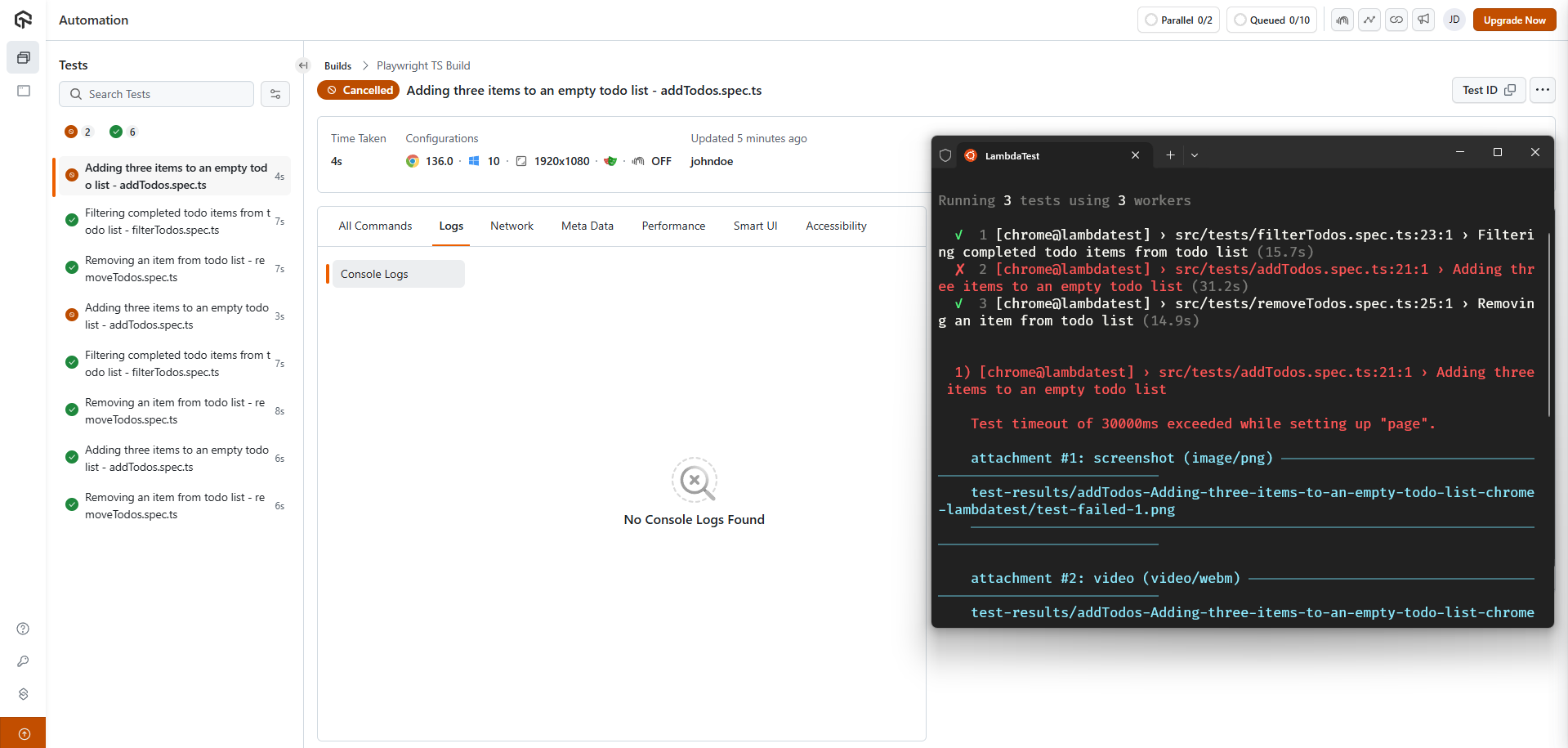 Debugging failures in LambdaTest can be frustrating when tests are aborted early. In the example above, a test times out, but the dashboard shows almost no useful information. The status says "Cancelled" instead of "Failed". There are no console logs, no error details, and no insight into where the test got stuck. Since the test ran remotely, reproducing the failure locally becomes harder, and you're left guessing what went wrong.
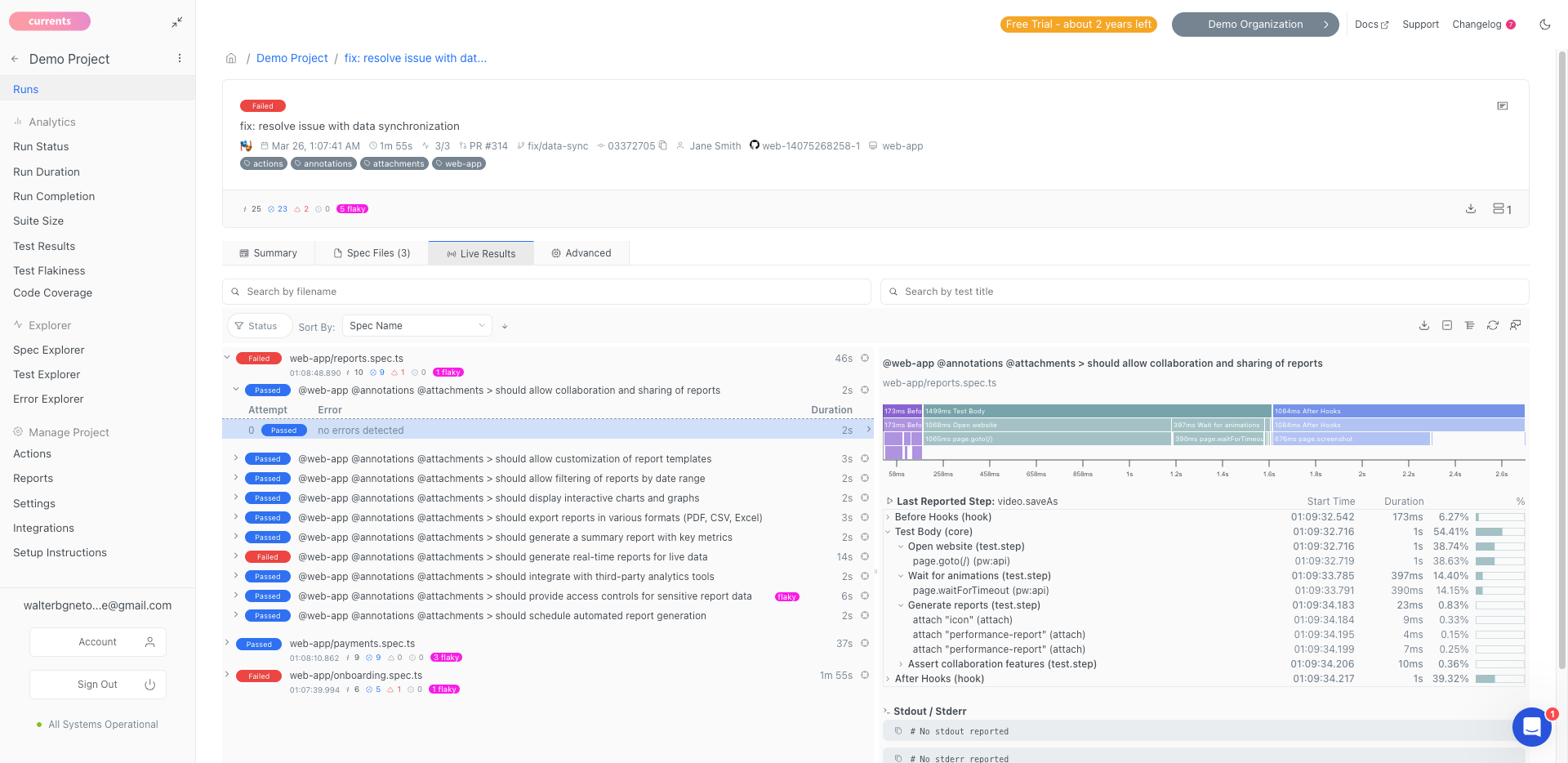 By contrast, Currents shows you everything! Even when a test crashes or times out. Since [each step is streamed in near real-time](https://docs.currents.dev/guides/parallelization-guide/step-level-reporting), each test attempt is tracked with full context: logs, errors, console output, traces, screenshots, and videos. You can immediately see the last executed step before the failure, making it much easier to understand what went wrong and fix the issue quickly.
### 2. **Playwright Native Capabilities**
By contrast, Currents shows you everything! Even when a test crashes or times out. Since [each step is streamed in near real-time](https://docs.currents.dev/guides/parallelization-guide/step-level-reporting), each test attempt is tracked with full context: logs, errors, console output, traces, screenshots, and videos. You can immediately see the last executed step before the failure, making it much easier to understand what went wrong and fix the issue quickly.
### 2. **Playwright Native Capabilities**
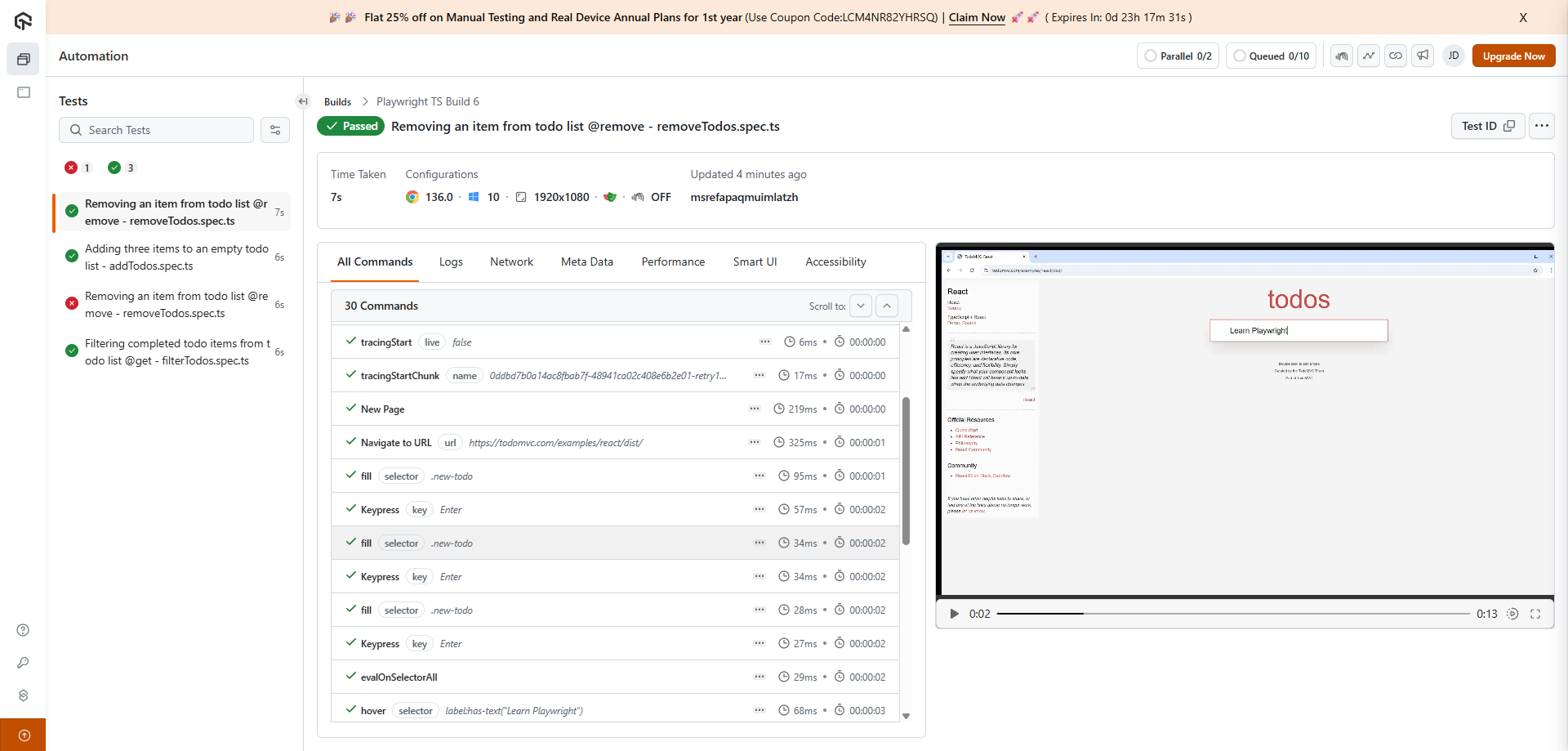 **LambdaTest:** Supports screenshots, videos, errors, network logs, and console logs. Since LambdaTest is just a remote browser and not an actual Playwright reporter, it offers no support for features like [test annotations](https://playwright.dev/docs/test-annotations), [trace viewer](https://playwright.dev/docs/trace-viewer-intro), [code coverage](https://playwright.dev/docs/api/class-coverage), [visual testing](https://playwright.dev/docs/test-snapshots) or [tags](https://playwright.dev/docs/test-annotations#tag-tests).
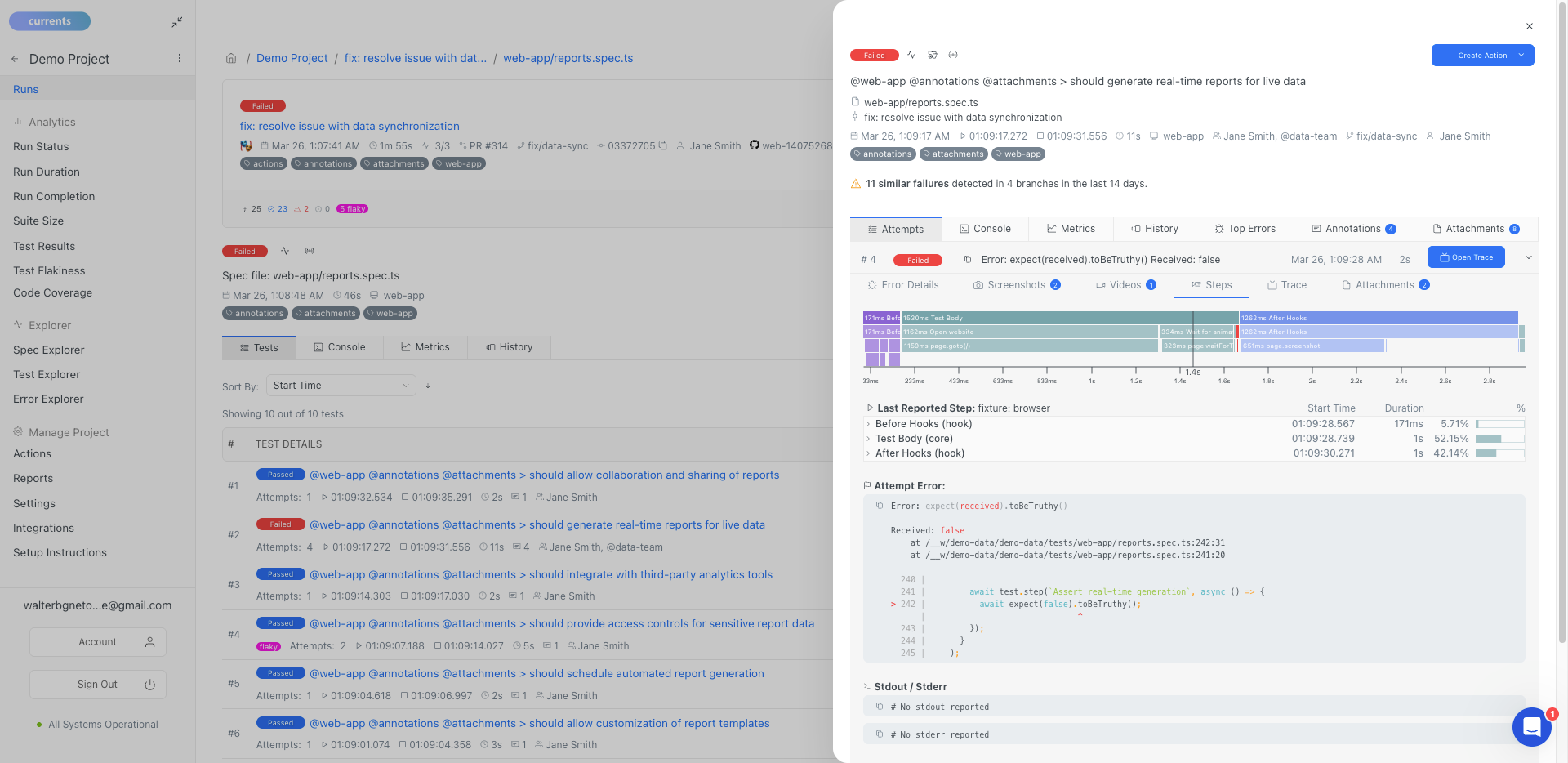 **Currents:** Full support for Playwright's native capabilities, including [test annotations](https://playwright.dev/docs/test-annotations), [trace viewer](https://playwright.dev/docs/trace-viewer-intro), [code coverage](https://playwright.dev/docs/api/class-coverage) and [visual testing](https://playwright.dev/docs/test-snapshots).
| Capability | LambdaTest | Currents |
| -------------- | ---------- | ---------------------------------------------------------------------------------- |
| Logs | ✅ | ✅ |
| Errors | ✅ | ✅ |
| Screenshots | ✅ | ✅ |
| Videos | ✅ | ✅ |
| Tags | ❌ | ✅ |
| Trace Viewer | ❌ | ✅ |
| Attachments | ❌ | ✅ |
| Annotations | ❌ | ✅ [Learn more](https://docs.currents.dev/guides/playwright-annotations) |
| Code Coverage | ❌ | ✅ [Learn more](https://docs.currents.dev/guides/coverage) |
| Visual Testing | ❌ | ✅ [Learn more](https://docs.currents.dev/guides/playwright-visual-testing) |
_Note: LambdaTest supports Visual Testing with their [Visual Regression Testing Cloud](https://www.lambdatest.com/visual-regression-testing) product, which does not leverage Playwright and is charged separately._
### 3. **Test Attempts**
One of the biggest differences between Currents and LambdaTest is how they handle test retries.
**Currents:** Full support for Playwright's native capabilities, including [test annotations](https://playwright.dev/docs/test-annotations), [trace viewer](https://playwright.dev/docs/trace-viewer-intro), [code coverage](https://playwright.dev/docs/api/class-coverage) and [visual testing](https://playwright.dev/docs/test-snapshots).
| Capability | LambdaTest | Currents |
| -------------- | ---------- | ---------------------------------------------------------------------------------- |
| Logs | ✅ | ✅ |
| Errors | ✅ | ✅ |
| Screenshots | ✅ | ✅ |
| Videos | ✅ | ✅ |
| Tags | ❌ | ✅ |
| Trace Viewer | ❌ | ✅ |
| Attachments | ❌ | ✅ |
| Annotations | ❌ | ✅ [Learn more](https://docs.currents.dev/guides/playwright-annotations) |
| Code Coverage | ❌ | ✅ [Learn more](https://docs.currents.dev/guides/coverage) |
| Visual Testing | ❌ | ✅ [Learn more](https://docs.currents.dev/guides/playwright-visual-testing) |
_Note: LambdaTest supports Visual Testing with their [Visual Regression Testing Cloud](https://www.lambdatest.com/visual-regression-testing) product, which does not leverage Playwright and is charged separately._
### 3. **Test Attempts**
One of the biggest differences between Currents and LambdaTest is how they handle test retries.
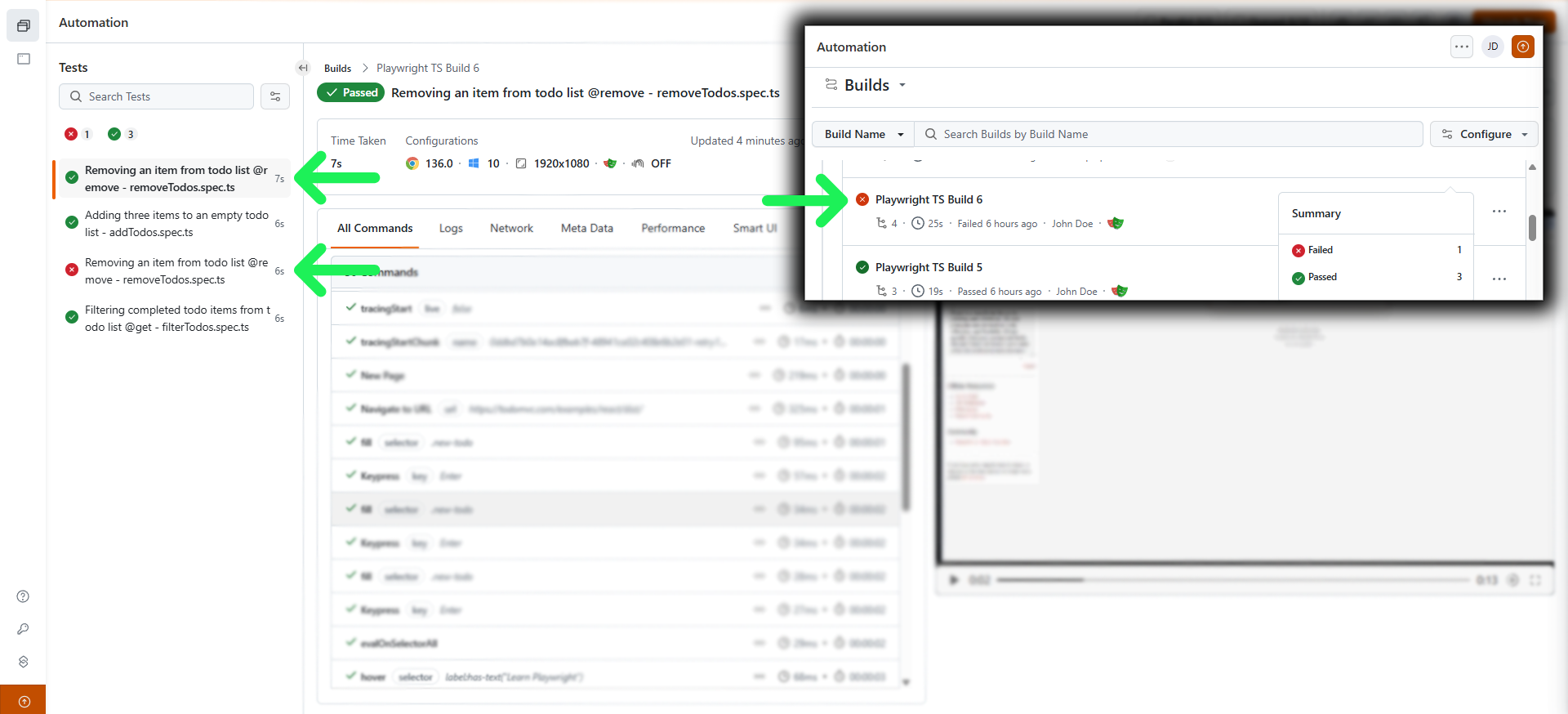 LambdaTest doesn’t recognize test attempts. If a test fails and then passes on retry, it still shows both outcomes separately, and the whole run is marked as failed. This makes it hard to trust the results, and it clutters the dashboard with duplicate tests that are really just retries.
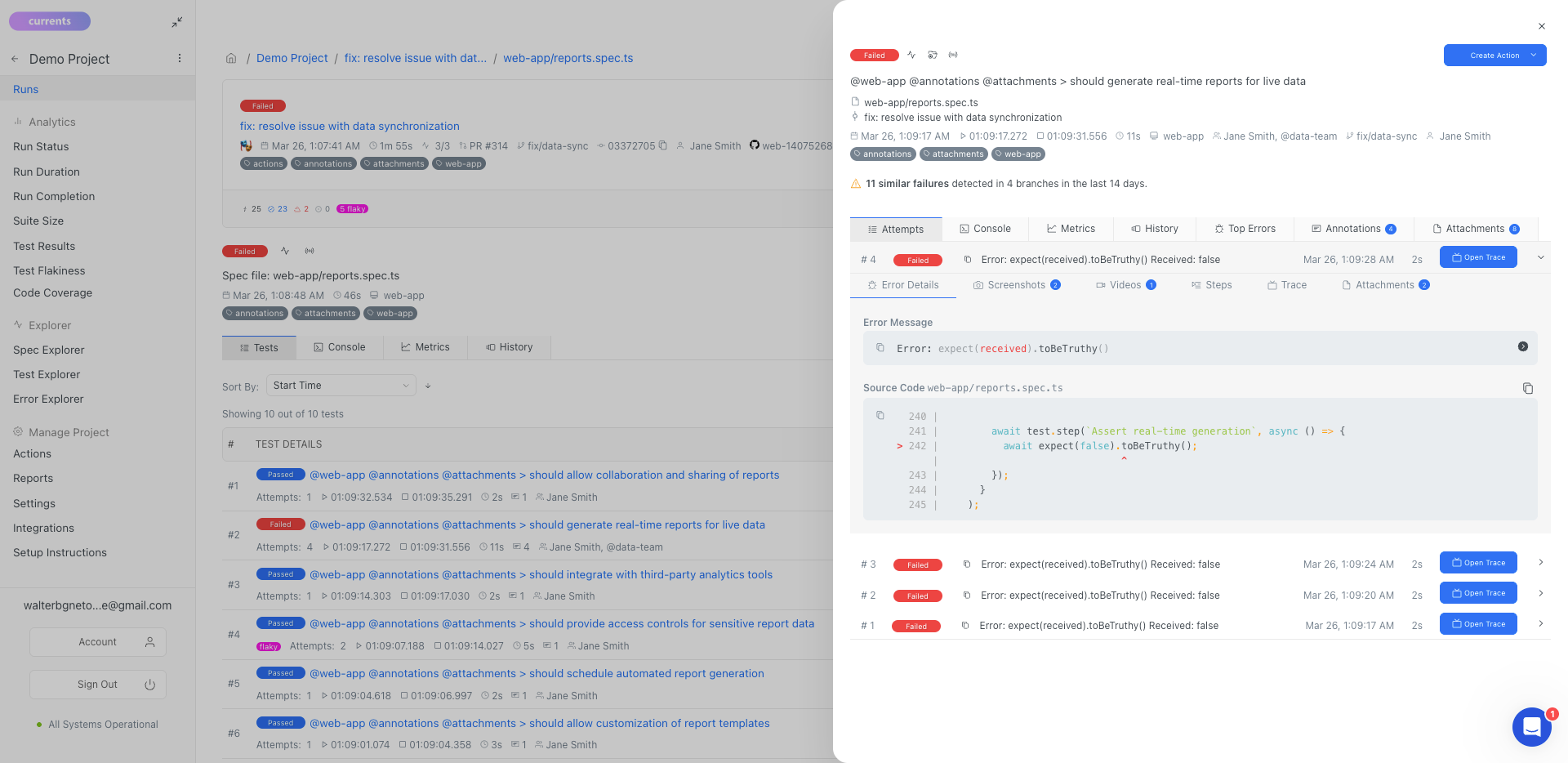 Currents tracks retries properly. It shows every attempt, with full debugging info like screenshots, logs, and traces for each one. If a retry passes, the run is marked as successful, and the test is flagged as flaky.
## **Feature Comparison Table**
Here's a detailed comparison of how these two solutions stack up against each other:
| Category | LambdaTest | Currents |
| ---------------------------------- | --------------------------------------------------------------------------------------------------------------------------------------------------------------------------------------------------------------------------------------------- | --------------------------------------------------------------------------------------------------------------------------------------------------------------------------------------------------------------------------------------------------------------------------------------------------------------------------------------------------------------------------------------------------------------------------------------------------------------------------------------------------------------------------------------------------------------------------------------------------------------------------------------------------------------------------------------------------------------------------------------------------------------------------------------------------------------------------------------------------------------------------- |
| **Setup & Integration** |
Currents tracks retries properly. It shows every attempt, with full debugging info like screenshots, logs, and traces for each one. If a retry passes, the run is marked as successful, and the test is flagged as flaky.
## **Feature Comparison Table**
Here's a detailed comparison of how these two solutions stack up against each other:
| Category | LambdaTest | Currents |
| ---------------------------------- | --------------------------------------------------------------------------------------------------------------------------------------------------------------------------------------------------------------------------------------------- | --------------------------------------------------------------------------------------------------------------------------------------------------------------------------------------------------------------------------------------------------------------------------------------------------------------------------------------------------------------------------------------------------------------------------------------------------------------------------------------------------------------------------------------------------------------------------------------------------------------------------------------------------------------------------------------------------------------------------------------------------------------------------------------------------------------------------------------------------------------------------- |
| **Setup & Integration** | - Not a reporter
- [Requires extending .test()](https://github.com/LambdaTest/playwright-sample/blob/main/playwright-test-ts/lambdatest-setup.ts#L45)
| - Single package installation
- [Minimal configuration needed](https://docs.currents.dev/getting-started/playwright/you-first-playwright-run)
|
| **Test Execution and Performance** | - Remote-browser test execution
- [Parallel Browsers](https://www.lambdatest.com/support/docs/parallel-testing-with-playwright/)
| - [Advanced test orchestration](https://docs.currents.dev/guides/parallelization-guide/pw-parallelization/playwright-orchestration)
- [Smart test distribution](https://docs.currents.dev/guides/parallelization-guide/load-balancing)
- [Playwright Sharding](https://docs.currents.dev/guides/parallelization-guide/pw-parallelization/playwright-sharding)
- [Re-run only failed tests](https://docs.currents.dev/guides/re-run-only-failed-tests)
[Running Failed Specs First](https://docs.currents.dev/guides/ci-optimization/load-balancing#optimal-sorting-by-the-failure-rate)- [Fail-Fast Strategy](https://docs.currents.dev/guides/parallelization-guide/fail-fast-strategy)
- [CI Tests on Spot Instances](https://docs.currents.dev/guides/parallelization-guide/pw-parallelization/ci-tests-on-spot-instances)
|
| **Reporting** | | - [Real-time test results streaming](https://docs.currents.dev/guides/parallelization-guide/pw-parallelization/step-level-reporting)
- [Flaky test detection](https://docs.currents.dev/dashboard/tests/flaky-tests)
- [Automated email reports](https://docs.currents.dev/dashboard/automated-reports)
|
| **Debug Capabilities** | - Screenshots & Videos
- Network logs and console data
| - Screenshots, Videos & Artifacts
- Network logs and console data
- [Real-time reporting](https://docs.currents.dev/guides/parallelization-guide/pw-parallelization/step-level-reporting)
- Step-by-step execution logs
- [Tags](https://docs.currents.dev/guides/playwright-tags)
- [Interactive trace viewer](https://playwright.dev/docs/trace-viewer)
|
| **Analytics** | - [Highly-customizable dashboards](https://www.lambdatest.com/support/docs/analytics-create-dashboard/)
| - [Trend analysis and insights](https://docs.currents.dev/dashboard/insights-and-analytics)
- [Code Coverage](https://docs.currents.dev/guides/coverage)
- Performance bottleneck analysis
|
| **Workflow Automation** | | - [Currents Actions](https://docs.currents.dev/guides/currents-actions)
- [CI/CD integrations](https://docs.currents.dev/getting-started/ci-setup)
- [API Access](https://docs.currents.dev/api)
- [Webhooks](https://docs.currents.dev/resources/integrations/http-webhooks)
|
| **Team Collaboration** | - Real-time team access
- Shared dashboards
- [Many integrations](https://www.lambdatest.com/integrations)
| - Real-time team access
- Shared dashboards
- Notes
- Jira integration
- Slack integration
- MS Teams integration
- GitHub integration
- GitLab integration
- BitBucket integration
|
| **Security** | - [Many security certifications](https://www.lambdatest.com/trust/security)
- [SSO/SAML integration](https://www.lambdatest.com/support/docs/single-sign-on/)
- Secure artifact storage
- Role-based access
| - [SOC 2 Type 2 compliance](https://currents.dev/security)
- [SSO/SAML integration](https://docs.currents.dev/dashboard/administration/sso-saml2.0)
- Secure artifact storage
- Role-based access
|
| **Infrastructure** | - Cloud-based platform
- Zero maintenance
- Automatic scaling
- Built-in redundancy
| - Cloud-based platform
- Zero maintenance
- Automatic scaling
- Built-in redundancy
|
| **Cost Model** | - Subscription-based
- Different products charges separately
- Email & Chat support included
| - Subscription-based
- Predictable pricing
- Includes all features
- Email & Chat support included
|
## **Conclusion**
LambdaTest has built an impressive platform with a wide range of products, including real device testing and extensive browser coverage. It’s a strong choice for teams needing broad testing infrastructure and access to diverse environments.
However, for teams invested in Playwright, using a platform with a native reporter is key to fully leverage the framework’s capabilities. Currents stands out as the purpose-built choice. With native Playwright support, real-time streaming, intelligent orchestration, and deep GitHub/GitLab integrations, Currents enables faster feedback cycles, deeper debugging, simpler CI workflows, and more efficient scaling.