---
title: "Alternative to BrowserStack for Playwright Testing"
description: "BrowserStack vs Currents"
canonical: "https://currents.dev/posts/browserstack-vs-currents"
updated: "2025-04-01"
---

# Alternative to BrowserStack for Playwright Testing

Published 2025-04-01 by Currents Team.

Canonical URL: https://currents.dev/posts/browserstack-vs-currents

BrowserStack vs Currents

---


When it comes to cloud-based testing solutions, BrowserStack is a name that often comes up. Known for its extensive cross-browser testing capabilities and a wide range of testing products, BrowserStack became a popular choice among developers and QA engineers.

In this article, we'll explore how Currents and BrowserStack compare across various aspects when it comes to Playwright testing to help you make an informed decision.

## **Overview**

### **BrowserStack**

BrowserStack is a cloud-based testing platform that provides remote browser testing capabilities across multiple devices and environments. It offers manual test management solutions and automated testing support for various frameworks including Playwright, along with features like flaky test detection and analytics.

While BrowserStack provides a comprehensive suite of testing tools, its broad focus on cross-browser and manual testing means the platform comes with multiple products and separate pricing models.

<LightboxCarousel
  slides={[
    {
      type: "image",
      src: "/img/posts/browserstack-vs-currents/1-browserstack-runs.png",
      description: "Runs",
    },

    {
      type: "image",
      src: "/img/posts/browserstack-vs-currents/2-browserstack-run-insights.png",
      description: "Run: Insights",
    },
    {
      type: "image",
      src: "/img/posts/browserstack-vs-currents/3-browserstack-run-tests.png",
      description: "Run: Tests",
    },
    {
      type: "image",
      src: "/img/posts/browserstack-vs-currents/4-browserstack-run-details.png",
      description: "Run: Test Details",
    },

    {
      type: "image",
      src: "/img/posts/browserstack-vs-currents/5-browserstack-analytics-health.png",
      description: "Analytics: Test Health",
    },
    {
      type: "image",
      src: "/img/posts/browserstack-vs-currents/6-browserstack-analytics-trends.png",
      description: "Analytics: Trends",
    },
    {
      type: "image",
      src: "/img/posts/browserstack-vs-currents/7-browserstack-unique-errors.png",
      description: "Analytics: Unique Errors",
    },
    {
      type: "image",
      src: "/img/posts/browserstack-vs-currents/8-browserstack-hosted-browsers.png",
      description: "Automate Product: Hosted Browser Runs",
    },
    {
      type: "image",
      src: "/img/posts/browserstack-vs-currents/9-browserstack-test-cases.png",
      description: "Test Management Product: Test Cases",
    },

]}
/>

#### **How it Works**

1. Playwright runs on your CI/CD pipeline.
1. Playwright connects to remote BrowserStack-hosted browsers ([BrowserStack Automate](https://www.browserstack.com/docs/automate/playwright)).
1. These browsers load the application under test and execute the tests.
1. Test results are collected in [BrowserStack's Test Observability](https://www.browserstack.com/docs/test-observability) dashboard.
1. Test cases are automatically added to [BrowserStack's Test Management](https://www.browserstack.com/docs/test-management) dashboard.

Alternatively, users can choose to run Playwright tests on a local browser and still report the results to BrowserStack's Test Observability platform, without using BrowserStack's hosted browsers.

### **Currents**

Currents is a cloud-based test observability platform designed to optimize test execution. It is particularly effective for managing large test suites and ensuring their reliability over time.

Currents is designed as a best-in-class Playwright observability platform that integrates with existing CI/CD pipelines to optimize test execution, provides real-time insights, and enhances team productivity. It provides reporting, debugging, analytics, faster executions with test orchestration, and historical insights.

<LightboxCarousel
  slides={[
    {
      type: "image",
      src: "/img/posts/dashboard/runs.png",
      description: "Runs",
    },
    {
      type: "image",
      src: "/img/posts/dashboard/run-details.png",
      description: "Run Details",
    },
    {
      type: "image",
      src: "/img/posts/dashboard/run-live-results.png",
      description: "Run Live Results",
    },
    {
      type: "image",
      src: "/img/posts/dashboard/run-specs.png",
      description: "Run Specs",
    },
    {
      type: "image",
      src: "/img/posts/dashboard/run-spec-tests.png",
      description: "Run Spec Tests",
    },
    {
      type: "image",
      src: "/img/posts/dashboard/test-drawer.png",
      description: "Test Details",
    },
    {
      type: "image",
      src: "/img/posts/dashboard/test-drawer-attempt-error-details.png",
      description: "Test Details: Attempt Error Details",
    },
    {
      type: "image",
      src: "/img/posts/dashboard/test-drawer-attempt-screenshots.jpg",
      description: "Test Details: Attempt Screenshots",
    },
    {
      type: "image",
      src: "/img/posts/dashboard/test-drawer-attempt-videos.jpg",
      description: "Test Details: Attempt Videos",
    },
    {
      type: "image",
      src: "/img/posts/dashboard/test-drawer-attempt-steps.png",
      description: "Test Details: Attempt Steps",
    },
    {
      type: "image",
      src: "/img/posts/dashboard/test-drawer-attempt-visual-diff.png",
      description: "Test Detail: Attempt Visual Testing",
    },
    {
      type: "image",
      src: "/img/posts/dashboard/test-drawer-attempt-attachments.png",
      description: "Test Detail: Attempt Attachments",
    },
    {
      type: "image",
      src: "/img/posts/dashboard/test-drawer-console.png",
      description: "Test Detail: Console",
    },
    {
      type: "image",
      src: "/img/posts/dashboard/test-drawer-metrics.png",
      description: "Test Detail: Metrics",
    },
    {
      type: "image",
      src: "/img/posts/dashboard/test-drawer-annotations.png",
      description: "Test Detail: Annotations",
    },
    {
      type: "image",
      src: "/img/posts/dashboard/analytics-run-status.png",
      description: "Analytics: Run Status",
    },
    {
      type: "image",
      src: "/img/posts/dashboard/analytics-run-duration.png",
      description: "Analytics: Run Duration",
    },
    {
      type: "image",
      src: "/img/posts/dashboard/analytics-run-completion.png",
      description: "Analytics: Run Completion",
    },
    {
      type: "image",
      src: "/img/posts/dashboard/analytics-suite-size.png",
      description: "Analytics: Suite Size",
    },
    {
      type: "image",
      src: "/img/posts/dashboard/analytics-test-results.png",
      description: "Analytics: Test Results",
    },
    {
      type: "image",
      src: "/img/posts/dashboard/analytics-test-flakiness.png",
      description: "Analytics: Test Flakiness",
    },
    {
      type: "image",
      src: "/img/posts/dashboard/analytics-code-coverage.png",
      description: "Analytics: Code Coverage",
    },
    {
      type: "image",
      src: "/img/posts/dashboard/spec-explorer.png",
      description: "Explorer: Specs",
    },
    {
      type: "image",
      src: "/img/posts/dashboard/test-explorer.png",
      description: "Explorer: Tests",
    },
    {
      type: "image",
      src: "/img/posts/dashboard/error-explorer.png",
      description: "Explorer: Errors",
    },
  ]}
/>

#### **How it Works**

1. Playwright runs on your own CI/CD pipeline.
2. Currents [orchestrates test execution to optimize parallel runs](https://docs.currents.dev/guides/parallelization-guide/pw-parallelization/playwright-orchestration).
3. Playwright uses browsers running on your CI.
4. Test results are collected in the Currents dashboard.

## **Understanding the Total Cost of Ownership**

BrowserStack’s pricing model is built around a large suite of over 12 different products. These products are priced separately, with an steep starting price and often based on custom contracts. This model can quickly become costly for teams looking to utilize multiple functionalities.

In contrast, Currents provides a simplified subscription-based offering for Playwright users, with no feature-gating, making it a more cost-effective solution for teams looking to utilize multiple functionalities.

## **Feature Comparison: BrowserStack vs. Currents**

### 1. **Test Orchestration and Parallelization**

<Lightbox
  slides={[
    {
      src: "/img/posts/browserstack-vs-currents/or8n.png",
      alt: "Currents Orchestration",
    },
  ]}
>
  <img
    src="/img/posts/browserstack-vs-currents/or8n.png"
    alt="Currents Orchestration"
    style={{ borderRadius: 10 }}
  />
</Lightbox>

**BrowserStack:** Provides no additional parallelization options. Users can leverage BrowserStack's browser grid and Playwright Sharding to run tests in parallel, but this means manual setup and additional costs.

**Currents:** Offers multiple optimized [parallel execution strategies](https://docs.currents.dev/guides/ci-optimization/playwright-parallelization), at no extra cost, including intelligent [test orchestration](https://docs.currents.dev/guides/parallelization-guide/pw-parallelization/playwright-orchestration) and running [CI Tests on Spot Instances](https://docs.currents.dev/guides/parallelization-guide/pw-parallelization/ci-tests-on-spot-instances). This feature ensures efficient use of resources and reduced test run times by distributing tests smartly across available CI infrastructure.

<Note>
  <strong>Customer Case:</strong>{" "}
  <a
    href="/posts/currents-and-fundguard"
    target="_blank"
    style={{ color: "var(--tw-prose-bold)" }}
  >
    {
      "How FundGuard sped up their CI E2E test pipeline by 50% and cut costs down by 70%"
    }
  </a>
</Note>

### 2. **Integrations**

<Lightbox
  slides={[
    {
      src: "/img/posts/microsoft-vs-currents/integrations.png",
      alt: "Integrations",
    },
  ]}
>
  <img
    src="/img/posts/microsoft-vs-currents/integrations.png"
    alt="Integrations"
    style={{ borderRadius: 10 }}
  />
</Lightbox>

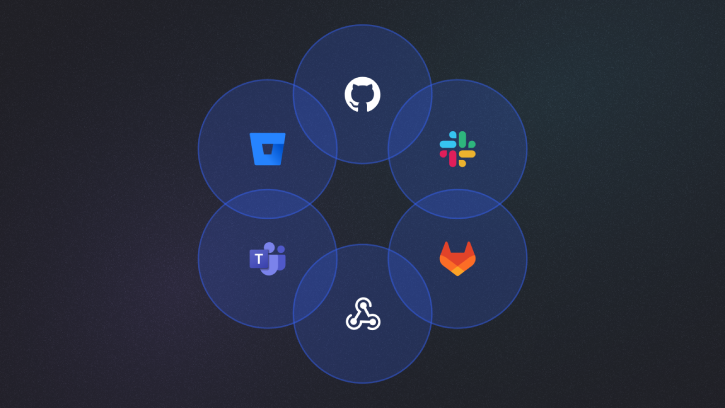
Both tools offer a wide range of integrations. While BrowserStack offers native integrations with JIRA and Asana, Currents offers native integrations with [Jira](https://docs.currents.dev/resources/integrations/jira), [GitHub](https://docs.currents.dev/resources/integrations/github/github-app), [GitLab](https://docs.currents.dev/resources/integrations/gitlab), [BitBucket](https://docs.currents.dev/resources/integrations/bitbucket), **allowing teams to easily quality gate Pull Requests with commit status checks**, and staying on top of their tests with run notifications directly on Pull Requests.

Teams looking to quality gate Pull Requests with BrowserStack have to [manually build their own pipeline checks using BrowserStack's API](https://www.browserstack.com/docs/test-observability/quality-gate/integrate-via-api).

<table>
  <thead>
    <tr>
      <th>Integration</th>
      <th>BrowserStack</th>
      <th>Currents</th>
    </tr>
  </thead>
  <tbody>
    <tr>
      <td>
        <strong>Git Providers</strong>
      </td>
      <td></td>
      <td></td>
    </tr>
    <tr>
      <td>GitHub</td>
      <td>❌</td>
      <td>✅</td>
    </tr>
    <tr>
      <td>GitLab</td>
      <td>❌</td>
      <td>✅</td>
    </tr>
    <tr>
      <td>BitBucket</td>
      <td>❌</td>
      <td>✅</td>
    </tr>
    <tr>
      <td>
        <strong>Messaging</strong>
      </td>
      <td></td>
      <td></td>
    </tr>
    <tr>
      <td>Slack</td>
      <td>✅</td>
      <td>✅</td>
    </tr>
    <tr>
      <td>MS Teams</td>
      <td>❌</td>
      <td>✅</td>
    </tr>
    <tr>
      <td>
        <strong>Project Management</strong>
      </td>
      <td></td>
      <td></td>
    </tr>
    <tr>
      <td>Jira</td>
      <td>✅</td>
      <td>Planned</td>
    </tr>
    <tr>
      <td>Asana</td>
      <td>✅</td>
      <td>Planned</td>
    </tr>
    <tr>
      <td>
        <strong>Misc</strong>
      </td>
      <td></td>
      <td></td>
    </tr>
    <tr>
      <td>Webhooks</td>
      <td>✅</td>
      <td>✅</td>
    </tr>
    <tr>
      <td>API</td>
      <td>✅</td>
      <td>✅</td>
    </tr>
  </tbody>
</table>

### 3. **Playwright Native Capabilities**

<Lightbox
  slides={[
    {
      src: "/img/posts/browserstack-vs-currents/browserstack-debug.png",
      alt: "Currents Orchestration",
    },
  ]}
>
  <img
    src="/img/posts/browserstack-vs-currents/browserstack-debug.png"
    alt="Currents Orchestration"
    style={{ borderRadius: 10 }}
  />
</Lightbox>

**BrowserStack:** Supports tags, screenshots, videos, step-level details, errors, network logs and console logs. No support for [test annotations](https://playwright.dev/docs/test-annotations), [trace viewer](https://playwright.dev/docs/trace-viewer-intro), [code coverage](https://playwright.dev/docs/api/class-coverage) or [visual testing](https://playwright.dev/docs/test-snapshots). The dashboard also makes no distinction between tests from different [Playwright projects](https://playwright.dev/docs/test-projects) in the same run.
<Lightbox
  slides={[
    {
      src: "/img/posts/dashboard/test-drawer-attempt-steps.png",
      alt: "Currents Orchestration",
    },
  ]}
>
  <img
    src="/img/posts/dashboard/test-drawer-attempt-steps.png"
    alt="Currents Orchestration"
    style={{ borderRadius: 10 }}
  />
</Lightbox>

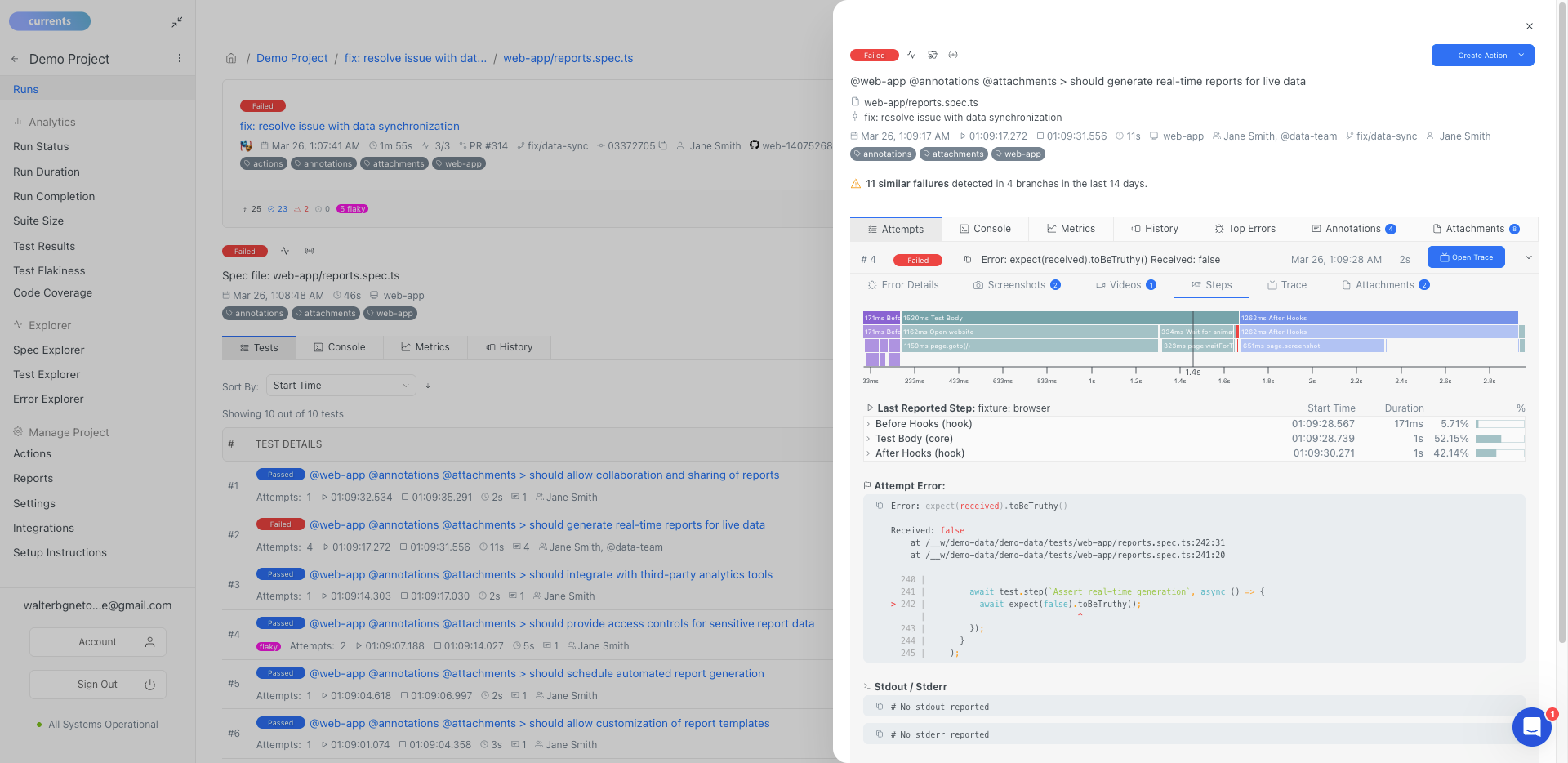
**Currents:** Full support for Playwright's native capabilities, including [test annotations](https://playwright.dev/docs/test-annotations), [trace viewer](https://playwright.dev/docs/trace-viewer-intro), [code coverage](https://playwright.dev/docs/api/class-coverage) and [visual testing](https://playwright.dev/docs/test-snapshots).

Unlike BrowserStack and other traditional solutions that upload results after test execution, Currents streams them in real-time. This allows for debugging failed CI runs. Even if an execution crashes, Currents captures the last step that caused the failure, providing crucial information to identify the root cause.

| Capability     | BrowserStack | Currents                                                                           |
| -------------- | ------------ | ---------------------------------------------------------------------------------- |
| Logs           | ✅           | ✅                                                                                 |
| Errors         | ✅           | ✅                                                                                 |
| Tags           | ✅           | ✅                                                                                 |
| Screenshots    | ✅           | ✅                                                                                 |
| Videos         | ✅           | ✅                                                                                 |
| Trace Viewer   | ❌           | ✅                                                                                 |
| Attachments    | ❌           | ✅                                                                                 |
| Annotations    | ❌           | ✅ &nbsp; [Learn more](https://docs.currents.dev/guides/playwright-annotations)    |
| Code Coverage  | ❌           | ✅ &nbsp; [Learn more](https://docs.currents.dev/guides/coverage)                  |
| Visual Testing | ❌           | ✅ &nbsp; [Learn more](https://docs.currents.dev/guides/playwright-visual-testing) |

_Note: BrowserStack supports Visual Testing with a product called [Percy](https://www.browserstack.com/docs/percy), which does not leverage Playwright and is charged separately._

## **Feature Comparison Table**

Here's a detailed comparison of how these two solutions stack up against each other:

| Category                           | BrowserStack                                                                                                                                                                                                                                                                                                                                   | Currents                                                                                                                                                                                                                                                                                                                                                                                                                                                                                                                                                                                                                                                                                                                                                                                                                                                                    |
| ---------------------------------- | ---------------------------------------------------------------------------------------------------------------------------------------------------------------------------------------------------------------------------------------------------------------------------------------------------------------------------------------------- | --------------------------------------------------------------------------------------------------------------------------------------------------------------------------------------------------------------------------------------------------------------------------------------------------------------------------------------------------------------------------------------------------------------------------------------------------------------------------------------------------------------------------------------------------------------------------------------------------------------------------------------------------------------------------------------------------------------------------------------------------------------------------------------------------------------------------------------------------------------------------- |
| **Setup & Integration**            | <ul><li>Single package installation</li><li>Native support for multiple frameworks</li><li>Minimal configuration needed</li></ul>                                                                                                                                                                                                              | <ul><li>Single package installation</li><li>Native support for multiple frameworks</li><li>Minimal configuration needed</li><li>Automatic artifact collection</li></ul>                                                                                                                                                                                                                                                                                                                                                                                                                                                                                                                                                                                                                                                                                                     |
| **Test Execution and Performance** | <ul><li>Remote-browser test execution</li><li>[Re-run only failed tests](https://www.browserstack.com/docs/test-observability/features/re-run)</li><li>Playwright Sharding</li><li>Manual CI integration</li></ul>                                                                                                                             | <ul><li>[Advanced test orchestration](https://docs.currents.dev/guides/parallelization-guide/pw-parallelization/playwright-orchestration)</li><li>[Smart test distribution](https://docs.currents.dev/guides/parallelization-guide/load-balancing)</li><li>[Playwright Sharding](https://docs.currents.dev/guides/parallelization-guide/pw-parallelization/playwright-sharding)</li><li>[Re-run only failed tests](https://docs.currents.dev/guides/re-run-only-failed-tests)</li>[Running Failed Specs First](https://docs.currents.dev/guides/ci-optimization/load-balancing#optimal-sorting-by-the-failure-rate)<li>[Fail-Fast Strategy](https://docs.currents.dev/guides/parallelization-guide/fail-fast-strategy)</li><li>[CI Tests on Spot Instances](https://docs.currents.dev/guides/parallelization-guide/pw-parallelization/ci-tests-on-spot-instances)</li></ul> |
| **Reporting**                      | <ul><li>[Flaky test detection](https://www.browserstack.com/docs/test-observability/features/smart-tags#flaky)</li><li>[Quality Gates](https://www.browserstack.com/docs/test-observability/quality-gate/overview)</li></ul>                                                                                                                   | <ul><li>[Real-time test results streaming](https://docs.currents.dev/guides/parallelization-guide/pw-parallelization/step-level-reporting)</li><li>[Flaky test detection](https://docs.currents.dev/dashboard/tests/flaky-tests)</li><li>[Automated email reports](https://docs.currents.dev/dashboard/automated-reports)</li></ul>                                                                                                                                                                                                                                                                                                                                                                                                                                                                                                                                         |
| **Debug Capabilities**             | <ul><li>Step-by-step execution logs</li><li>Screenshots & Videos</li><li>Network logs and console data</li><li>[Smart Tags](https://www.browserstack.com/docs/test-observability/features/smart-tags)</li><li>[Auto Failure Analysis](https://www.browserstack.com/docs/test-observability/features/auto-failure-analysis)</li></ul>           | <ul><li>[Real-time reporting](https://docs.currents.dev/guides/parallelization-guide/pw-parallelization/step-level-reporting)</li><li>Step-by-step execution logs</li><li>Screenshots, Videos & Artifacts</li><li>Network logs and console data</li><li>[Tags](https://docs.currents.dev/guides/playwright-tags)</li><li>[Interactive trace viewer](https://playwright.dev/docs/trace-viewer)</li></ul>                                                                                                                                                                                                                                                                                                                                                                                                                                                                     |
| **Analytics**                      | <ul><li>[Highly-customizable dashboards](https://www.browserstack.com/docs/test-observability/dashboards/manage-dashboards)</li><li>[Test Health](https://www.browserstack.com/docs/test-observability/features/tests-health)</li><li>[Testing Trends](https://www.browserstack.com/docs/test-observability/features/testing-trends)</li></ul> | <ul><li>[Trend analysis and insights](https://docs.currents.dev/dashboard/insights-and-analytics)</li><li>[Code Coverage](https://docs.currents.dev/guides/coverage)</li><li>Performance bottleneck analysis</li></ul>                                                                                                                                                                                                                                                                                                                                                                                                                                                                                                                                                                                                                                                      |
| **Workflow Automation**            | <ul><li>[Mute tests](https://www.browserstack.com/docs/test-observability/features/mute-tests)</li><li>Manual CI/CD integration</li><li>[API Access](https://www.browserstack.com/docs/test-observability/api-reference)</li><li>[Webhooks](https://www.browserstack.com/docs/test-observability/webhooks/getting-started)</li></ul>           | <ul><li>[Currents Actions](https://docs.currents.dev/guides/currents-actions)</li><li>[CI/CD integrations](https://docs.currents.dev/getting-started/ci-setup)</li><li>[API Access](https://docs.currents.dev/api)</li><li>[Webhooks](https://docs.currents.dev/resources/integrations/http-webhooks)</li></ul>                                                                                                                                                                                                                                                                                                                                                                                                                                                                                                                                      |
| **Team Collaboration**             | <ul><li>Real-time team access</li><li>Shared dashboards</li><li>Comments</li><li>Jenkins integration</li><li>Slack integration</li><li>Jira integration</li><li>Asana integration</li></ul>                                                                                                                                                    | <ul><li>Real-time team access</li><li>Shared dashboards</li><li>Notes</li><li>Jira integration</li><li>Slack integration</li><li>MS Teams integration</li><li>GitHub integration</li><li>GitLab integration</li><li>BitBucket integration</li></ul>                                                                                                                                                                                                                                                                                                                                                                                                                                                                                                                                                                                                                         |
| **Security**                       | <ul><li>[SOC 2 Type 2 compliance](https://www.browserstack.com/trust/soc-2)</li><li>SSO/SAML integration</li><li>Secure artifact storage</li><li>Role-based access</li></ul>                                                                                                                                                                   | <ul><li>[SOC 2 Type 2 compliance](https://currents.dev/security)</li><li>[SSO/SAML integration](https://docs.currents.dev/dashboard/administration/sso-saml2.0)</li><li>Secure artifact storage</li><li>Role-based access</li></ul>                                                                                                                                                                                                                                                                                                                                                                                                                                                                                                                                                                                                                                         |
| **Infrastructure**                 | <ul><li>Cloud-based platform</li><li>Zero maintenance</li><li>Automatic scaling</li><li>Built-in redundancy</li></ul>                                                                                                                                                                                                                          | <ul><li>Cloud-based platform</li><li>Zero maintenance</li><li>Automatic scaling</li><li>Built-in redundancy</li></ul>                                                                                                                                                                                                                                                                                                                                                                                                                                                                                                                                                                                                                                                                                                                                                       |
| **Cost Model**                     | <ul><li>Usage-based</li><li>Different products charges separately</li><li>Email support</li></ul>                                                                                                                                                                                                                                              | <ul><li>Subscription-based</li><li>Predictable pricing</li><li>Includes all features</li><li>Email & Chat support included</li></ul>                                                                                                                                                                                                                                                                                                                                                                                                                                                                                                                                                                                                                                                                                                                                        |

## **Conclusion**

BrowserStack continues to be a robust and highly capable tool for cross-browser and manual testing, especially for teams needing diverse testing environments. However, for those focused on Playwright testing, Currents offers unique advantages through its deep integration with Playwright, real-time test result streaming, and efficient CI orchestration. While BrowserStack is an excellent choice for broader testing needs, Currents provides a more streamlined and optimized solution for teams prioritizing Playwright efficiency and responsiveness.